



Cheap DTF Printer Mistakes to Avoid for Reliable Printing Results
The Hardware Traps (Traps 1-4)
Buying a cheap DTF printer sounds tempting, but there are hidden hardware pitfalls beginners often miss. These hardware traps can cost you time, money, and print quality, especially if you’re new to direct to film printing problems. Let’s dive into the first four traps you should avoid:
Trap #1: The \’Modified\’ Desktop Printer Scam
Many sellers offer modified Epson L1800 DTF conversion kits or other desktop printers marketed as full-fledged DTF machines. The problem? These are often unreliable, with poor build quality and zero support.
Why it matters: The original printer isn’t designed for continuous white ink use or heavy-duty textile printing. Expect frequent clogging, printhead failures, and frustrating maintenance headaches.
Avoid this trap by:
- Checking if the printer is purpose-built for DTF, not just “converted”
- Asking for detailed specs and warranty coverage
- Prioritizing machines with proven track records over cheap knockoffs
Trap #2: Ignoring the White Ink Circulation System (WICS)
White ink is critical in DTF printing—but it’s tricky to manage. A proper White Ink Circulation System (WICS) keeps the ink flowing and prevents sediment buildup, avoiding printhead clogging and inconsistent prints.
The risk: Cheap printers often skip or skimp on WICS, leading to downtime and expensive repairs.
What to watch for:
- Confirm the printer has an automatic or semi-automatic WICS
- Look for user reviews mentioning consistent white ink flow and fewer clogs
- Remember, white ink maintenance costs can add up without WICS
Trap #3: The Single Printhead Bottleneck
Some budget machines use just one printhead to handle all colors plus white ink. This might sound cost-effective but it slows production and increases wear on the printhead.
The problem: High production demands overload a single printhead, causing faster degradation and poorer print resolution DPI—which hurts color accuracy and durability.
Smart choice: Select printers with multiple printheads or high-quality XP600 vs i3200 printhead options to balance speed and print quality.
Trap #4: Plastic vs. Metal Mechanics
Cheap printers often rely on plastic gears, frames, and moving parts to keep upfront costs low. While this works for hobbyists, plastic parts wear out faster under the rigors of commercial DTF printing.
Why it matters: Metal mechanics bring longevity, stability, and better print alignment. Plastic may cause PET film jamming and increased maintenance.
Pro tip: Look for machines with a sturdy metal frame and industrial DTF printer specs—it’s a long-term investment that saves headaches and costs.
Avoid these hardware traps, and you’ll be on your way to reliable, high-quality DTF printing. In the next sections, we\’ll explore hidden costs and vendor pitfalls—because buying cheap isn’t always cheap in the end.
The Hidden Cost Traps (Traps 5-7)
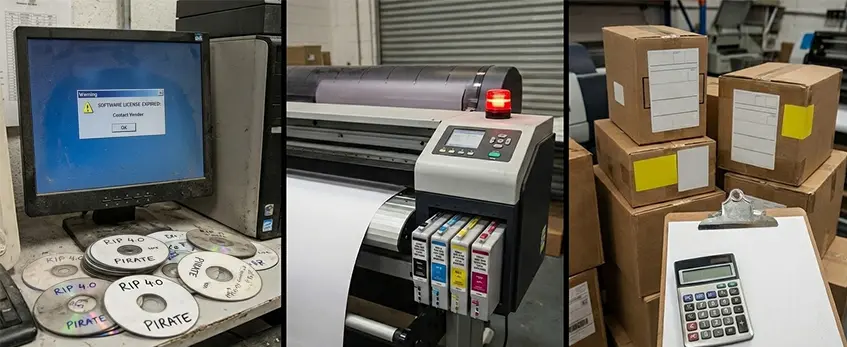
When buying a cheap DTF printer, the upfront price is only part of the story. Many beginners fall into hidden cost traps that quietly drain your budget later.
Trap #5: Locked or Pirated RIP Software
RIP software, like AcroRIP or Cadlink, controls your print quality and color matching, including DTF ICC color profiles. Some low-cost printers come with locked or even pirated versions of this software. This means you could face expensive upgrade fees or unstable performance. Without legitimate software, printhead clogging and color issues become frequent headaches, costing you both time and money.
Trap #6: Proprietary Consumables Lock-in
Cheap DTF printers often lock you into proprietary consumables—think special inks, PET films, or DTF powder—available only from the manufacturer or exclusive suppliers. These can cost significantly more than generic options. This \”consumable lock-in\” forces you to pay premium prices indefinitely, inflating your DTF maintenance costs and lowering your overall return on investment (ROI).
Trap #7: Undisclosed Shipping and Import Duties
Many bargain DTF printer deals online don’t include shipping or import duties in the initial price, especially if the printer ships internationally. Surprise customs fees, taxes, or long shipping delays can add hundreds to your final cost and push back your printing schedule. Always ask for a full price breakdown before committing to avoid being caught off guard.
By knowing these hidden traps, you can budget smarter and avoid common pitfalls in Direct to Film printing problems. For reliable machines avoiding these issues, check out this guide to a DTF printer for T-shirts that balances price and performance well.
The Support & Vendor Traps (Traps 8-10)
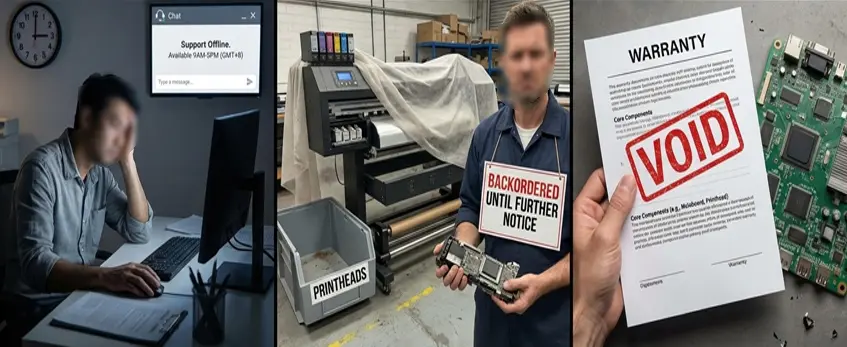
When buying a cheap DTF printer, support and vendor reliability can make or break your experience. Here are three traps to watch out for:
Trap #8: The \’Time Zone\’ Support Gap
Many budget DTF printer sellers operate overseas, which means when you need help, support is often offline due to time differences. This delay can cost you days of downtime, especially if you’re tackling direct to film printing problems like printhead clogging or PET film jamming. Make sure your vendor offers timely, U.S.-based support or at least overlapping hours to keep your business running smoothly.
Trap #9: Lack of Spare Parts Availability
A cheap DTF printer might look great at first, but if spare parts like printheads (XP600 or i3200) or white ink circulation system components aren’t readily available, repairs become a nightmare. This leads to long wait times and higher maintenance costs. Confirm the vendor stocks essential parts locally and that replacements are easy to source.
Trap #10: No Warranty on Core Components
Printheads, mechanics, and the white ink circulation system represent the heart of your printer. Some cheap offers skip providing warranties on these key parts, leaving you exposed to expensive replacements. Always check the warranty terms for printhead coverage and core components before buying, so you won’t be stuck paying full price if something breaks.
Avoiding these support and vendor traps can save you time, frustration, and unexpected expenses—crucial for anyone serious about DTF printing. For the best balance of quality and service, consider learning why Jinlong DTF is the safe middle ground in today’s textile printing equipment market.
How to Spot a \’Good Value\’ Machine: The Jinlong DTF Standard
When hunting for a cheap DTF printer, spotting a good value machine can feel tricky. Avoid the common pitfalls by focusing on key features that make all the difference in the long run. The Jinlong DTF standard stands out because it balances affordability with reliable industrial specs, making it the safe middle ground between hobbyist gadgets and expensive commercial models.
The Checklist for Success
Here’s a quick checklist to help you find a machine that delivers without hidden headaches:
- Reliable Printhead: Opt for models with proven printheads like Epson’s XP600 or i3200, known for better durability and fewer clogs.
- White Ink Circulation System (WICS): Essential for preventing ink settling and printhead clogging issues common in DTF printing.
- Heavy-Duty Mechanics: Look for metal construction over plastic to avoid frequent breakdowns caused by wear and tear.
- Unlocked RIP Software Compatibility: Avoid pirated or locked software that could limit your workflow and cause extra expenses. Leading software options include AcroRIP and Cadlink.
- Spare Parts and Warranty Coverage: Check that you can easily get replacement parts and that core components like printheads have solid warranty terms.
- Transparent Costs: Be wary of hidden fees like shipping or import duties which can add to your total investment unexpectedly.
Jinlong printers tick these boxes, offering consistent print quality and the kind of maintenance support missing in many cheaper alternatives. Their models handle common Direct to Film printing problems effectively, while keeping maintenance costs manageable — something you\’ll appreciate over time.
For example, their use of proper white ink circulation and well-designed mechanics helps reduce PET film jamming and printhead clogging — two major frustrations for new DTF users. Plus, stabilized RIP software support means better control over your DTF ICC color profiles and accurate color output.
Discover more about the printer inks and films designed to work seamlessly with Jinlong machines through their DTF transfer film options — a perfect match for those aiming for vibrant and durable prints without overspending.
By choosing a Jinlong DTF printer, you avoid the common traps that turn a cheap DTF printer into an expensive headache. It\’s the smart middle ground for U.S. textile printers who want professional quality without the high commercial price tag.





 English
  Español
  Deutsch
  Français