



Best DTF Film for Professional Printers Color Accuracy Durability 2026
If you’re a professional printer aiming to stay ahead in 2026, choosing the best DTF film isn’t just a step—it’s the foundation of your success. With custom apparel booming and demands for true-to-life colors, unmatched durability, and lean workflows skyrocketing, the right film can cut reprints by up to 30% and speed up your production like never before. In this guide, you’ll discover how to maximize color accuracy, durability, and efficiency with cutting-edge DTF films designed for Epson, Ricoh, and next-gen printers. Ready to unlock pro-level results and future-proof your print shop? Let’s dive in.
Understanding DTF Film Fundamentals: Key Specs for Professional Setups
DTF transfer film is at the heart of every successful direct-to-film printing job. For professional printers aiming to maximize color accuracy, durability, and efficiency, knowing the basics and technical specs is crucial.
Core Components and Their Performance Impact
DTF film typically includes:
- PET Film Base: Provides stability and smooth surface for printing.
- Adhesive Coating: Holds the DTF powder and ensures strong fabric bonding.
- Release Layer: Allows easy peeling after printing and powder application.
Each plays a vital role:
| Component | Role | Impact on Performance |
|---|---|---|
| PET Film | Printing substrate | Influences image sharpness and durability |
| Adhesive Layer | Holds powder and transfers ink | Affects wash-resistance and comfort |
| Release Layer | Facilitates peel-off | Dictates peel type and timing |
Hot Peel vs. Cold Peel vs. Instant Peel
Understanding peel types helps optimize workflow and results:
- Hot Peel DTF Sheets: Peel while warm; excellent adhesion but slightly longer cooldown.
- Cold Peel DTF Film: Peel after full cooling; suited for complex designs, reduces ghosting.
- Instant Peel (Emerging): Peel immediately to speed up production; still evolving in market.
| Peel Type | Peel Time | Best For | Pros | Cons |
|---|---|---|---|---|
| Hot Peel | Warm (~30 seconds) | Fast workflows | Strong adhesion | Needs precise timing |
| Cold Peel | Cool (~60 seconds) | Intricate designs | Cleaner transfers | Longer wait time |
| Instant Peel | Immediate | High-volume production | Time-saving | May require specific films/inks |
Printer Compatibility Essentials
Your DTF film choice must align with your printer’s specs, or color and durability will suffer. Key points to check:
- Ink Compatibility: Ensure film works with your printer\’s DTF ink
- Print Head Compatibility: Film should handle heat and printing pressure without warping
- Size & Thickness: Match film size to printer specs for smooth feeding
Pro Tip: Test film samples with your printer model before bulk purchasing to avoid workflow disruptions.
Getting these fundamentals right sets a solid foundation for vibrant, durable, and cost-effective DTF printing. Up next, we’ll dive into color accuracy—how to achieve true-to-design vibrancy that wows your clients every time.
Evaluating Color Accuracy: Achieving True-to-Design Vibrancy
Color accuracy is critical when choosing the best DTF film for professional printers. It ensures that your transfers reflect the original design with vibrant, consistent colors every time. To hit that sweet spot, paying attention to color gamut, Delta E values, and ICC profiling is a must.
Metrics That Matter—Gamut, Delta E, and ICC Profiling
- Color Gamut: A wider color gamut on your DTF film means more colors can be faithfully reproduced. Look for films that support a broad range of hues, especially if your designs rely on subtle shades or gradients.
- Delta E: This metric measures the difference between the printed color and the intended color. For professional results, aim for Delta E values under 2, signaling highly accurate color matching.
- ICC Profiling: Using accurate ICC profiles tuned for your specific printer, ink, and DTF film setup helps maintain color consistency across prints and reduces guesswork in color management.
Testing Protocols for Pros
To ensure color accuracy, conduct systematic testing by:
- Printing color swatches and comparing them under consistent lighting.
- Measuring physical samples with colorimeters or spectrophotometers.
- Adjusting your ICC profiles based on test results to fine-tune output.
Following these protocols helps avoid surprises during production runs, keeping colors true-to-design.
2026 Innovations in Color Tech
The latest DTF films offer breakthroughs in pigment technology and PET film coatings that boost color vibrancy and ink adhesion. Some new films incorporate enhanced coating layers that improve ink absorption, reducing blotching and enhancing sharpness. Additionally, advancements in DTF ink compatibility enable smoother ink layering, making prints pop with better saturation.
For a step-by-step approach on optimizing DTF color output, check out this detailed full workflow guide to DTF printing that covers everything from file prep to final cure.
By focusing on these color accuracy essentials, you can confidently pick a DTF film that makes your prints look sharp, vibrant, and professional every time.
Prioritizing Durability: From Adhesion to Long-Term Wear Resistance
Durability is a top priority when choosing the best DTF film for professional printers. It starts with strong adhesion—the film’s ability to bond consistently with different fabrics. This is essential for wash-resistant DTF transfers that hold up over time without cracking or peeling.
Adhesive Powder Integration and Fabric Versatility
A key factor in durability is the quality and evenness of the DTF powder adhesion. The adhesive powder acts like the glue, securing the ink from the DTF ink compatibility to the fabric. Films designed for uniform powder distribution prevent weak spots that can cause peeling.
Choosing the right film also depends on your fabric range. Premium PET film for DTF printing supports a variety of materials—cotton, polyester, blends, and even delicate fabrics—keeping transfers breathable and comfortable without sacrificing hold.
Real-World Durability Benchmarks
Pro users expect durable prints that survive at least 50+ washes without fading or flaking. Tests simulating household laundry (warm water, mild detergent) are the industry standard for real-world wear resistance. Films featuring advanced adhesive formulas, like those in our DTF transfer film 60cm Double Basic Series, consistently meet these benchmarks.
Troubleshooting Durability Issues
If durability problems arise, consider these common triggers:
- Uneven powder application: Check powder spread and oven curing times.
- Wrong curing temperature: Under- or over-heating affects adhesion strength.
- Fabric incompatibility: Some materials repel adhesive powders or need specialized films.
- Incompatible inks: Always match DTF film with recommended DTF ink types and printer models.
Addressing these points ensures your prints stay sharp, vibrant, and durable throughout their lifespan.
Boosting Efficiency: Streamline Your Workflow for High-Volume Output
When running a professional shop, efficiency is key—especially for high-volume DTF printing. The right DTF film can cut down your print-to-press time, reducing costly bottlenecks. Look for films designed with fast drying and smooth powder adhesion, which directly speed up your workflow without sacrificing quality.
Speed and Cost Metrics
- Drying Time: Films that dry quickly allow faster peeling and pressing cycles, speeding up overall production.
- Powder Usage: Efficient adhesive powder bonding means less waste and fewer reprints.
- Film Thickness: Thinner PET film for DTF printing not only reduces costs but also improves transfer flexibility, lowering customer complaints.
Integration with Pro Printer Ecosystems
For seamless operation, your DTF film must be compatible with your printer\’s ink system and curing process. Brands like jinlong DTF offer films tailored to professional printers that sync smoothly with Epson DTF film setups and other high-volume machines. This reduces trial and error, keeps downtime minimal, and guarantees crisp, consistent results every time. Check out jinlong’s advanced DTF printing solutions to see how their products fit into modern print environments.
Scaling for 2026: Automation and Sustainability
As demand grows, automation becomes a definite advantage. Look for films that work well with automated powdering and curing systems to maintain speed and quality with less manual effort. Also, sustainability is growing in priority—eco-friendly DTF supplies like recyclable PET films and low-VOC adhesives help printers reduce environmental impact while appealing to conscious customers.
Optimizing efficiency through the right DTF film choice directly impacts your bottom line by cutting costs, boosting output, and supporting sustainable growth in 2026 and beyond.
Top Recommendations: The Best DTF Films for 2026 Professional Printers
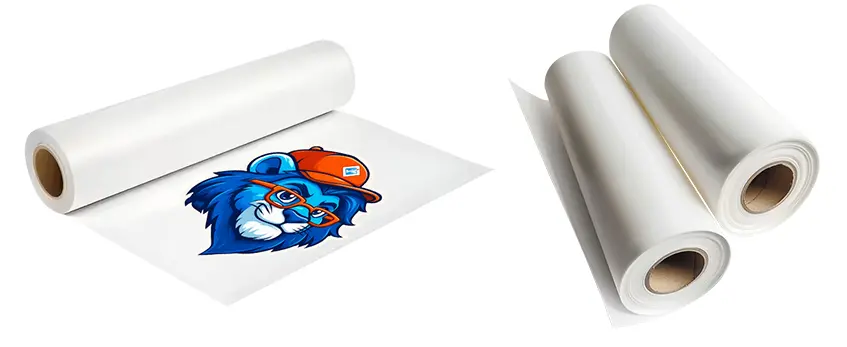
When it comes to professional DTF printing in 2026, choosing the right DTF film makes all the difference for color accuracy, durability, and workflow efficiency. After testing and reviewing multiple products, here are the top 5 DTF films that are leading the pack this year:
- Jinlong DTF Transfer Film (50cm Double Pro Series) – Known for outstanding color vibrancy and consistent adhesive quality, Jinlong’s film supports high-detail prints and pairs well with a range of DTF inks.
- Eco-Friendly PET Film for DTF Printing – Ideal for shops prioritizing sustainability without compromising on performance.
- Cold Peel DTF Film (Premium Grade) – Offers smooth peeling process and excellent wash fastness across fabrics.
- Hot Peel DTF Sheets with Enhanced Adhesive Powders – Perfect for fast turnaround while maintaining transfer durability.
- Metallic DTF Film 2026 Edition – Adds a striking finish to specialty prints, suitable for fashion and promotional items.
Why Jinlong DTF Stands Out
Jinlong DTF film consistently ranks as a favorite among professional printers because of its fine balance between color accuracy, adhesion, and ease of use. Here’s why it’s a top choice for 2026 setups:
- Superior Color Gamut: Jinlong film supports rich, true-to-design colors that hold up after washing and wear.
- Reliable Adhesive Powder Integration: The film’s surface is engineered for strong powder bonding, enhancing wash resistance and durability.
- Broad Printer Compatibility: Works seamlessly with professional DTF printers, including Epson DTF ink setups.
- Efficient Workflow: Its double pro series design optimizes print speed and peel options, which can boost production.
If you want further insight into the Jinlong DTF film and ink combo, check out their detailed DTF transfer film 50cm double pro series product page or explore how their DTF inks work seamlessly alongside the film for the best results at scale with the DTF ink CMYK 1L 1000ml Pro Series.
In , for any professional printer aiming to maximize color precision, durability, and efficiency in 2026, Jinlong DTF film strongly stands out as a reliable, high-performance choice among the best DTF films available today.
Implementation Guide: Step-by-Step Setup and Optimization
Getting the best results with your DTF film starts with a solid setup and fine-tuning your workflow. Here’s a straightforward guide to help professional printers in the U.S. optimize their DTF printing process for maximum color accuracy, durability, and efficiency.
1. Prepare Your Equipment
- Printer Compatibility: Ensure your professional DTF printer supports the specific DTF transfer film you\’re using. For example, popular Epson models pair well with many PET films for DTF printing.
- Ink Selection: Use DTF ink that matches your film’s requirements to avoid clogs and color inconsistencies.
2. Load and Test Film
- Load your chosen DTF film—whether it’s hot peel, cold peel, or instant peel—according to the manufacturer’s instructions.
- Run test prints to check ink density, film adhesion, and color vibrancy before moving to full production.
3. Adjust Print Settings
- Calibrate ICC profiles tailored to your DTF film and printer model. This helps lock in true-to-design colors and optimal gamut coverage.
- Experiment with resolution and print speed settings to balance quality and throughput.
4. Optimize Powder Adhesion
- Apply DTF powder evenly and at the recommended thickness based on film type.
- Use proper curing temperatures and times to ensure the powder bonds well without compromising durability.
5. Execute Transfer Process
- Follow the adhesive activation process precisely—whether it’s hot peel or cold peel—to maximize wash resistance and wear.
- Use a professional heat press setup for consistent temperature and pressure across your transfers.
6. Quality Control and Adjustment
- Inspect every print for color accuracy and adhesion. Use Delta E measurements if possible to quantify color matching.
- Track wash-resistant DTF transfers over time to monitor durability and adjust adhesive or curing parameters as needed.
For proven DTF films optimized for professional setups, check out Jinlong’s Single Pro Series film—designed to deliver consistent quality with high color fidelity and robust durability in commercial environments.
By following these steps, you ensure your printing setup is optimized for 2026 standards, balancing color vibrancy, transfer strength, and workload efficiency to stay competitive in today’s market.





 English
  Español
  Deutsch
  Français