



Best Desktop DTF Printers 2026 Reviews Features and Buyers Guide
The Evolution of Desktop DTF: What Changed in 2026?
The desktop DTF printer market in 2026 has seen remarkable leaps that push the boundaries of what small-format textile printing can achieve. If you’ve been following the direct to film printing process, you know that the earlier generation desktop printers mostly relied on modified Epson L1800 printheads. While effective for entry-level needs, those systems struggled with speed, maintenance, and color fidelity for growing business demands.
Next-Gen Printheads: i3200 and XP600 for Desktop Sizes
One of the biggest shifts came with the integration of dedicated Epson i3200 and XP600 printheads designed specifically for desktop DTF printers. Unlike the Epson L1800 setups that were retrofitted from photo printers, these next-gen heads offer:
- Higher resolution and sharper details tailored for fabric transfers
- Enhanced ink drop control that improves color vibrancy and precision
- Extended durability, meaning less downtime and replacement frequency
This transition means 2026 desktop DTF printers deliver pro-level print quality without the bulk or price tag of large-format machines.
Automated Maintenance Tackles White Ink Clogging
If you’ve ever dealt with desktop DTF printing, you know white ink clogging was the industry’s Achilles’ heel. The thick, heavily pigmented white ink used in white ink circulation systems tends to settle and clog nozzles, leading to print failures and costly downtime.
In 2026, manufacturers have cracked this problem with advanced circulation and agitation systems integrated into desktop units:
- Continuous white ink agitation keeps pigments evenly suspended
- Automated ink circulation pumps cycle white ink regularly, preventing sediment buildup
- Maintenance routines that are built into the printer firmware, alerting you before issues arise
This means you get consistent white layer prints with far fewer interruptions, making your workflow smoother.
Speed vs. Footprint: A3+ Production Speeds in Tabletop Size
Another game-changer for desktop DTF printers in 2026 is the balance between speed and compactness. The latest models boast A3+ print widths combined with production speeds previously only seen in larger, floor-model printers. Key engineering breakthroughs include:
- Optimized dual printhead designs doubling throughput without expanding size
- Efficient ink drying and powdering systems tailored for tabletop use
- Smarter firmware that maximizes print pass overlap with minimal waste
What this means for you is high-volume small business printing solutions without sacrificing valuable workspace — perfect for startups, kiosks, and home offices looking to scale.
In , 2026’s desktop DTF printers have evolved from hobbyist tools into serious textile transfer technology machines. With next-gen Epson i3200 and XP600 printheads, automated maintenance for white ink management, and A3+ speeds in compact forms, these printers meet the demands of modern custom apparel business equipment head-on.
Critical Buyer’s Criteria: How to Judge a Desktop DTF Printer
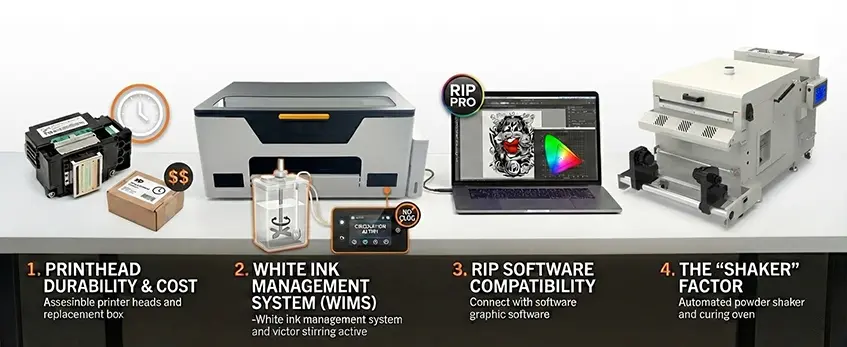
When choosing the best desktop DTF printer in 2026, some key features make all the difference between hassle and smooth operation.
Printhead Durability & Cost
Printheads are the heart of any DTF printer. In 2026, models either use Epson i3200 or XP600 printheads, both designed for longer lifespans than the older L1800 variants. Consider not just how long the printhead lasts but also the replacement costs. A durable, affordable printhead means less downtime and lower maintenance expenses over time.
White Ink Management System (WIMS)
White ink clogging used to be a major problem. Now, advanced White Ink Circulation Systems actively keep the ink flowing and prevent settling, which means fewer headaches and consistent, professional prints. If your printer lacks a solid WIMS, expect frequent clogging and poor print quality.
RIP Software Compatibility
Your choice of RIP software isn’t just about printing—it impacts color accuracy and ink use. Printers that work seamlessly with popular RIP programs like CadLink or AcroRIP give you better control over color profiling and reduce ink wastage, essential for maintaining a cost-effective printing process.
The \’Shaker\’ Factor
Drying your prints is just as important as printing them. You’ll need to decide between a manual DTF curing oven and an automated desktop shaker/dryer combo. Automated combos save time and space, plus they improve powder adhesion and overall print durability, making them a smart pick for busy small businesses or custom apparel setups.
For more on key features to look for in 2026, check out this detailed overview of the best DTF transfer printer key features to make an informed choice.
Top Desktop DTF Printer Reviews (2026 Edition)
-

JL-DTF301B A3 DTF Printer XP600 【Applicable to beginner sets】
View more View more -
JL-DTF302S DTF Digital Printer
View more View more -
JL-DTF602S DTF Digital Printer Best Product Print Quality Package
View more View more -
JL-DTF604S DTF Digital Printer Best Product Print Quality Package
View more View more -
JL-DTF604P DTF Digital Printer [Pro Series]
View more View more


![JL-DTF604P DTF Digital Printer [Pro Series]](http://jinlongprints.com/wp-content/uploads/2025/07/JL-DTF604P-300x300.webp)
1. The Overall Market Leader: Jinlong DTF [Model Name/Series]
The Jinlong DTF remains the top choice for anyone looking for a reliable desktop DTF printer in 2026. This model perfectly balances speed, image resolution, and consistent print quality, making it a standout for small to medium businesses scaling up their production. With a print width that handles A3 and A3+ sizes, it features a dual printhead setup combining Epson i3200 and XP600 technology, designed specifically for DTF printing. Its proprietary ink flow system keeps white ink circulation smooth, dramatically reducing downtime.
Pros: Superior color vibrancy, minimal maintenance, and excellent customer support make it a smart investment.
Best For: Businesses wanting A3+ production speeds in a compact, reliable printer for custom apparel production.
2. The Budget-Friendly Contender
Ideal for startups or small shops working with limited budgets, this model offers decent print quality without breaking the bank. It handles standard A3 sizes and provides enough features to get new businesses started with direct to film printing process equipment. The trade-off is slower print speeds and simpler maintenance requirements, which means it’s less suited for high-demand environments but a solid entry-level option overall.
3. The Speed Demon (Dual-Head Focus)
Designed for high-volume output in limited spaces, this machine pairs two fast printheads to crank out prints at impressive speeds without taking up too much desktop real estate. It’s perfect for businesses with tight deadlines that need A3+ capacity and can’t afford to wait. While it pushes speed, it still maintains decent color accuracy, thanks to modern RIP software compatibility with CadLink and AcroRIP.
4. The Compact Specialist
For those with super tight workspaces, like kiosks or home offices, this printer takes a minimalist approach with the smallest footprint available in 2026. It excels at handling smaller batch jobs with no sacrifice in print quality, thanks to innovative engineering that maximizes space efficiency without losing key desktop DTF printer features.
If you’re curious about eco-friendly options and materials alongside these printers, consider checking out the latest on sustainable PET films and DTF inks for greener printing solutions here.
Deep Dive: Why Jinlong DTF Stands Out
When it comes to the best desktop DTF printer in 2026, Jinlong DTF truly leads the pack, especially for small to medium businesses looking for reliability and quality. One major factor is its precision engineering. Unlike many competitors that use plastic casings to cut costs, Jinlong’s machines feature sturdy metal bodies. This design not only enhances durability but also minimizes vibrations during high-speed printing, keeping every print sharp and consistent.
Color accuracy is another standout feature. Jinlong invests heavily in custom ICC profiles that match what you see on your screen to what prints on the PET film. This reduces guesswork, saves ink, and ensures vibrant, true-to-design colors every time—ideal for anyone who depends on consistent output in their custom apparel business. Plus, these profiles work seamlessly with popular RIP software for DTF like CadLink and AcroRIP, helping manage ink consumption efficiently.
On the customer support side, Jinlong offers a robust ecosystem. You get solid warranties, fast parts availability, and a technical support team that’s responsive and knowledgeable. This means less downtime and smoother operations, which is critical when you’re scaling production. For a deeper understanding of how Jinlong machines perform in real-world setups, check out this detailed DTF transfer printer setup guide.
In , Jinlong’s metal build, precision color management, and customer-focused service are what make it a top choice in the 2026 desktop DTF printer lineup.
The Hidden Costs of Ownership (Reality Check)
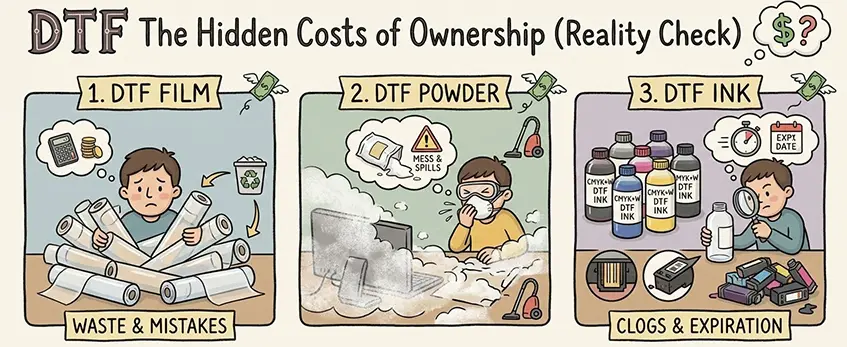
When investing in a desktop DTF printer, knowing the true cost of ownership goes beyond the upfront price. Consumables, maintenance, and environment setup add up quickly. Here’s what to expect in 2026.
Consumables Breakdown: Real Cost Per Print
Calculating your cost per print means factoring in:
| Consumable | Average Cost | Notes |
|---|---|---|
| DTF Ink | $0.30 – $0.50 per print | Depends on color coverage and brand |
| PET Film Transfer | $0.10 – $0.15 per sheet | Quality varies, affects print smoothness |
| Hot Melt Powder | $0.05 – $0.08 per print | Essential for adhesion, costs add up with volume |
These figures vary with your print volume and ink consumption, so investing in a printer with efficient white ink circulation system and good ink management helps reduce waste.
Maintenance Schedule: Keep Your Desktop DTF Running Smoothly
Regular maintenance is critical to avoid costly repairs:
- Daily: Agitate white ink, clean printheads lightly to prevent clogging.
- Weekly: Deep clean printheads, check ink filters and circulation pumps.
- Monthly: Inspect and clean the printer’s interior, calibrate printheads, and verify powder shaker or curing oven functionality.
Automated maintenance features in 2026 models have cut down manual upkeep, but understanding these routines can extend a printer’s lifespan.
Environment: Humidity and Ventilation Requirements
Desktop DTF printing needs specific environmental controls for optimal results:
- Humidity Control: Ideal range is 40%-60% RH to prevent ink drying or buildup.
- Ventilation: Efficient DTF curing oven fume extraction avoids harmful odors and powder dust buildup, protecting both equipment and workspace air quality.
Controlling these factors ensures consistent print quality and fewer downtime issues.
For more detailed advice on maintenance and setup, check the DTF transfer printer buying guide to make sure your small business printing solutions are future-proof.
FAQ: Common Questions from Buyers
Can a desktop DTF printer handle high-volume orders?
Yes, many 2026 desktop DTF printers, especially models with dual printheads like the Jinlong DTF series, are designed to handle medium to high-volume production. They deliver A3+ production speeds in a compact footprint, making them ideal for small to medium businesses scaling up without investing in large-format machines.
What is the difference between DTF and White Toner printing?
Direct to Film (DTF) printing uses specialized inkjet printers with white ink circulation systems to print designs on PET film, then transfers them with hot melt powder and a curing oven. White toner printing, on the other hand, uses toner-based laser technology. DTF offers better color vibrancy and flexibility with a broader range of substrates, while white toner setups are often more limited and expensive to maintain.
How long do the printheads on a Jinlong DTF machine last?
Jinlong integrates advanced Epson i3200 and XP600 printheads known for durability and cost efficiency. With proper maintenance and the latest automated agitation systems preventing white ink clogging, these printheads can last thousands of hours—usually between 1 to 2 years under heavy use. Replacement costs are competitive, but sticking to genuine ink and parts helps extend printhead lifespan.
Do I need a specialized computer to run the RIP software?
Not necessarily. Most RIP software compatible with desktop DTF printers, like CadLink and AcroRIP, run on standard Windows PCs. However, to ensure smooth processing of detailed color profiles and large printing jobs, investing in a computer with a good processor, enough RAM, and a high-quality graphics card is recommended. This setup helps optimize ink consumption and color accuracy for professional results.
For more detailed insights on managing your desktop DTF printer, exploring a complete cost breakdown can be very helpful.





 English
  Español
  Deutsch
  Français