



A3 DTF Transfer Film Guide for Vibrant Durable High-Quality Prints
Introduction to DTF Printing and A3 Transfer Film
DTF (Direct-to-Film) printing is a versatile and efficient method for creating vibrant, detailed designs on various fabrics. Instead of printing directly onto textiles, you print your design onto a special PET transfer film, which is then coated with hot-melt powder and heat pressed onto the fabric. This approach requires no pretreatment, making it a straightforward solution for customizing apparel like t-shirts, hoodies, and bags.
The A3 size transfer film (11.7\” x 16.5\”) is ideal for small to medium production runs. It offers the perfect balance between printing area and material usage, letting you efficiently produce quality transfers without wasting film or ink. Plus, the A3 format fits well with popular desktop DTF printers, making it accessible for small print shops, startups, and hobbyists.
Here are some key benefits of using A3 DTF film sheets for your printing needs:
- No pretreatment required: Saves time and effort on fabric preparation.
- Vibrant colors on any fabric: Works great on cotton, polyester, blends, nylon, and more.
- Cost-effective for custom apparel: Low setup costs and less waste make it perfect for short runs and personalized orders.
With A3 DTF transfer film, you get high-quality, durable prints that stand out, all while keeping your production efficient and budget-friendly.
Understanding A3 DTF Transfer Film: Types and Specifications
A3 DTF transfer film usually features a PET (polyethylene terephthalate) base that provides a smooth and durable foundation. This base is layered with several coatings to ensure top-quality prints:
- Ink-receptive layer: Holds the DTF inks firmly for vivid, clear images.
- Release layer: Allows easy peeling after heat pressing.
- Antistatic coating: Prevents dust and particles from sticking during printing.
Hot-peel vs. Cold-peel vs. Hybrid Films
| Film Type | Pros | Cons | Ideal For |
|---|---|---|---|
| Hot-peel | Quick peel after pressing; less sticking | Risk of incomplete transfer if timing is off | Fast production runs |
| Cold-peel | Stronger adhesion & durability | Takes longer to peel; more careful handling | High-detail prints, delicate fabrics |
| Hybrid | Combines benefits of both; moderate peel time | Slightly more expensive | Versatile use, mixes efficiency & durability |
Thickness and Finish
- Typical thickness: Around 75μm (microns), balancing flexibility and strength.
- Single-sided films print on one side, while double-sided allow printing both sides, useful for complex prints or when two layers are needed.
- Finishes come in matte (less glare, soft touch) and glossy (sharper color pop).
Why Quality Matters
High-quality A3 DTF film ensures clean prints with fine details and vibrant colors that last wash after wash. Poor film quality leads to ink bleeding, peeling, or fading, reducing the lifespan of your custom apparel prints. For the best results, choose films with smooth coatings and reliable release layers.
For more in-depth info on choosing the right film and ink compatibility, check out this detailed guide on DTF ink compatibility.
Essential Equipment for High-Quality A3 DTF Printing
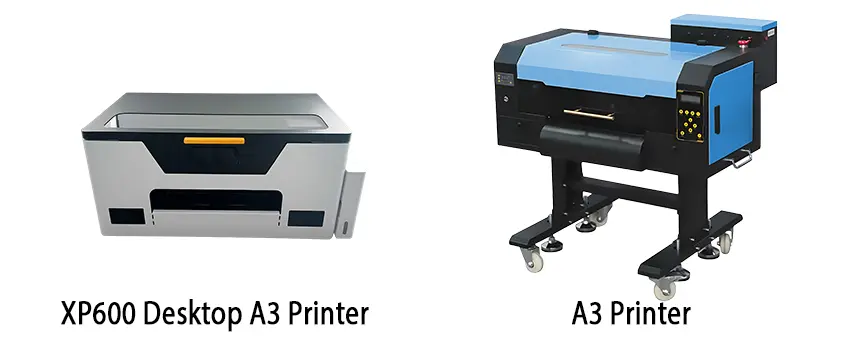
To get the best results with A3 DTF transfer film, having the right equipment is a must. Popular A3 DTF printers like Epson L1800 conversions and the XP600 models offer reliable print quality and smooth workflows for small to medium runs. These printers handle CMYK plus white ink with circulation systems perfectly, ensuring vibrant colors and consistent opacity on your transfers.
For inks, use compatible DTF-specific CMYK inks paired with a well-circulated white ink. This combination prevents clogging and maintains sharp print details, which is crucial for high-quality DTF printing on cotton, polyester, or blends.
Hot-melt powder plays a big role in transfer durability. There are different types available—fine powders ensure even coating, while coarser options may be better for faster applications. Application methods like electrostatic powdering or manual sifting help achieve uniform coverage.
Don’t forget curing gear: a curing oven set to the right temperature solidifies the ink and powder layers before heat pressing. A reliable heat press is essential for consistent, even pressure; typical DTF heat press settings for A3 transfers run around 150-160°C (300-320°F) for 10-15 seconds under medium pressure.
For those setting up or upgrading, check out reliable A3 DTF printers and accessories designed specifically to optimize your direct to film transfer process. This gear combo ensures your prints stay sharp, vibrant, and durable every time.
Step-by-Step DTF Printing Process Using A3 Film
Mastering the direct-to-film transfer process with A3 DTF transfer film involves a few key steps to get high-quality, durable prints every time. Here’s a simple guide:
1. Design Preparation
- Use RIP software to set up your artwork with correct color profiles.
- Include a white ink layer beneath colors for opacity, essential on darker fabrics.
- Prepare your file at A3 size (11.7\” x 16.5\”) for optimal print layout.
2. Printing on A3 Film
- Load the A3 DTF film sheets (preferably PET base) into your printer.
- Adjust printer settings for excellent ink adhesion—use CMYK + white ink with circulation to prevent clogging.
- Print your design in reverse if needed, depending on film type.
3. Applying Hot-Melt Powder
- Immediately after printing, evenly sprinkle hot-melt powder over the wet ink.
- Shake off excess powder to avoid clumps, ensuring smooth transfer and strong adhesion.
- For best results, use a powder suited for A3 printing like the TPU DTF hot melt adhesive powder.
4. Curing the Transfer
- Cure the printed film with powder in a heat oven or dryer at around 90-110°C (194-230°F) for about 2-3 minutes.
- Proper curing melts the powder into the ink while maintaining flexibility.
5. Heat Pressing
Set your heat press with these parameters for durable DTF transfers:
| Parameter | Recommended Setting |
|---|---|
| Temperature | 150-160°C (302-320°F) |
| Time | 10-15 seconds |
| Pressure | Medium (moderate, even) |
- Press the cured film onto the fabric (cotton, polyester, blends).
- Avoid too much pressure to prevent ink bleed or film distortion.
6. Peeling and Post-Pressing
- Peel the film hot or cold according to your film type (hot-peel for most A3 films).
- After peeling, give it a quick post-press (3-5 seconds) to lock in print durability and reduce cracking.
Following these clear steps ensures your A3 DTF printer setup yields sharp, vibrant prints with excellent adhesion and washability. For more on perfect heat press practices, check out this guide on best practices for heat pressing DTF.
Achieving High-Quality Results: Best Practices and Tips
To get the most out of your A3 DTF transfer film, focusing on color accuracy and opacity is key. Use RIP software settings tailored for white ink circulation to ensure vibrant, true-to-design colors. This is especially important since the white ink layer provides the base for vivid prints on any fabric.
Fabric compatibility matters too—test your prints first on cotton, polyester, nylon, and blends. Each reacts differently to the DTF transfer process, so small trials can prevent costly mistakes later.
Proper storage and handling of your A3 DTF film sheets are crucial. Keep them in a dry, clean environment to avoid moisture or oil contamination, which can cause poor powder adhesion and dull prints. Using airtight containers or sealed bags helps maintain film quality over time.
For better productivity on the A3 film size, consider using gang sheets. Grouping multiple designs on one sheet saves time and powder, making your DTF printing more efficient without sacrificing print quality.
Applying these best practices will ensure durable DTF apparel prints with sharp details and long-lasting vibrancy. For deeper insights into preventing powder clumping during curing, you can explore the function and temperature control of DTF powder dryers here.
Common Problems and Troubleshooting in A3 DTF Transfer

Running into issues with your A3 DTF transfer film can slow down your production and affect print quality. Here are some common problems and how to fix them:
Poor Powder Adhesion or Clumping:
This usually happens when the hot-melt powder isn’t applied evenly or the powder quality is low. Make sure you use the best DTF powder for A3 printing and apply it uniformly. Gently shake off excess powder before curing to prevent clumps.
Ink Bleeding, Warping, or Ghosting:
Ink bleeding occurs when printing settings are off or the film isn’t suited for your printer. Check your A3 DTF printer setup to ensure proper white ink circulation and correct print temperatures. Warping or ghosting often results from improper drying or pressing; adjust curing times or heat press settings (usually around 150-160°C and 10-15 seconds) for a sharper transfer.
Transfer Failures (Incomplete Adhesion or Cracking):
These issues may arise if the heat press temperature or time isn’t right or if the fabric isn’t compatible. Always test on fabrics like cotton, polyester, or blends before full runs. Ensure even pressure during heat pressing and follow the peeling method (hot peel or cold peel) recommended for your transfer film.
Maintenance for Printers and Films:
Keeping your printer clean and regularly maintaining ink circulation, especially white ink, is key to preventing clogging and dull results. Store your A3 DTF film sheets in a dry, dust-free place to avoid moisture buildup, which can affect adhesion and print quality.
By addressing these common challenges, you’ll enjoy high-quality DTF transfers and smoother production. For more tips on choosing the right equipment, check out our guide on how to choose the right top DTF printer.
Why Choose jinlong DTF Films for A3 Printing
When it comes to high-quality A3 DTF transfer film, jinlong DTF films stand out for several reasons:
Superior Ink Absorption and Release
- Jinlong\’s PET transfer film features a specially coated ink-receptive layer that ensures sharp, vibrant prints.
- The release layer allows easy peeling without damage, minimizing ink residue and waste.
- Supports white ink circulation DTF for bright, even layers essential in multi-color designs.
Durable Prints That Last
| Feature | Jinlong DTF Films |
|---|---|
| Wash Resistance | 50+ washes without fading or cracking |
| Color Vibrancy | Consistently vivid colors on cotton, polyester, blends |
| Print Longevity | Maintains high-quality finish over time |
Wide Compatibility with A3 Printers
- Works flawlessly with popular A3 DTF printer setups like Epson L1800 conversions and XP600 series.
- Compatible with most hot peel DTF film and cold peel DTF transfer processes.
- Tested with jinlong’s recommended CMYK + white inks to provide smooth, reliable results.
Real User Feedback and Comparisons
- Users consistently report ink adhesion improvements and fewer transfer failures.
- Side-by-side tests show jinlong DTF film delivers sharper details and better wash durability compared to other brands.
- Ideal for businesses focusing on durable, vibrant custom apparel using A3 film sheets.
For best results, pair jinlong DTF films with their professional A3 double pro series transfer film and quality CMYK + white DTF inks designed to maximize print clarity and longevity.





 English
  Español
  Deutsch
  Français