

No products in the cart.

Jinlong
Best Settings for A3+ DTF Printer Ink Film and Temperature Guide
Struggling to nail the best settings for A3+ DTF printer setups? Whether you’re battling white ink clogging, inconsistent film adhesion, or heat press overheating, dialing in the right ink, film, and temperature is key to unlocking vibrant, durable transfers every time. In this guide, you’ll get clear, actionable advice tailored to A3+ printers—think Epson L1800-based systems—with tested tips on DTF ink limits, powder curing temperatures, hot vs. cold peel films, and printer calibration. If you’re ready to stop wasting time and material, and start producing crisp, professional transfers that stand the test of wash and wear, keep reading.
Understanding A3+ DTF Printing Basics
The A3+ DTF printer, with its 13×19 inch print area, offers a perfect balance between size and flexibility for small-run custom apparel. Direct to Film (DTF) printing on this format involves printing your design with pigment-based ink onto a special transfer film, then applying adhesive powder and heat-curing to create durable, vibrant transfers.
Key advantages of A3+ DTF printer settings:
- Ideal for small batches: Allows fast turnaround without the setup costs of screen printing.
- High detail and color vibrancy: Thanks to fine DPI settings, designs pop on various fabrics.
- Versatility: Works well on cotton, polyester, and blends without limiting fabric choices.
- Lower waste and cost: You print only what you need, avoiding excess film use.
Despite these benefits, A3+ setups often stumble on:
- Ink oversaturation, causing blotchy prints or nozzle clogging if ink limits aren’t dialed in.
- Incorrect film choice, leading to poor ink absorption or lifting after transfer.
- Unstable temperature control in the print environment impacting ink viscosity and curing.
Proper A3+ DTF printer settings tackle these issues head-on by balancing ink load, film compatibility, and temperature stability — ultimately ensuring clean prints and strong adhesive bonds. Using jinlong DTF inks and films optimized for the 13×19 size can make all the difference in reliability and print quality.
Choosing and Optimizing DTF Ink for A3+ Printers
When it comes to A3+ DTF printer settings, the right ink choice is key. Most DTF printers use pigment-based inks in CMYK plus white formulations. The white ink plays a crucial role in opacity, giving prints that bright, vibrant look, especially on dark fabrics. CMYK inks handle the full color range, ensuring your designs pop.
To avoid common issues like oversaturation or nozzle clogging, keep ink loads within recommended limits. Overloading ink can cause smudging or slow drying times. Regular ink circulation is essential—this keeps pigments evenly mixed and prevents white ink from settling and clogging the print heads.
Here are some quick tips for vibrant colors and smooth white ink performance:
- Follow specific ink load guidelines to balance saturation and flow
- Perform routine nozzle checks and ink head cleanings
- Use proper ink circulation routines between prints
- Store inks at stable room temperature to maintain viscosity
Choosing jinlong DTF inks offers a compatibility boost since these inks are optimized for A3+ DTF printers. They flow smoothly, resist clogging, and deliver consistent color vibrancy. Plus, jinlong keeps you stocked on reliable ink options tailored for top performance with your transfer film and powder.
For a seamless workflow with your A3+ DTF setup, pairing jinlong’s high-quality inks with compatible films like those in the jinlong DTF transfer film A4 Single Pro Series lineup can dramatically improve your print results and reduce maintenance hassles.
Selecting the Right DTF Transfer Film for A3+ Printing
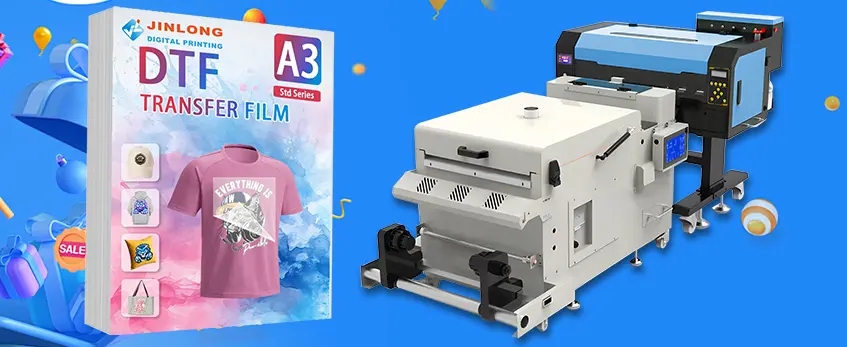
Choosing the proper DTF transfer film is critical for top-quality prints on your A3+ DTF printer. Here’s a quick look at what matters:
| Film Type | Pros | Cons | Best Use Case |
|---|---|---|---|
| Hot Peel | Easy and quick release, less waiting | Can cause slight texture on prints | Soft hand-feel apparel |
| Cold Peel | Smoother finish, vibrant colors | Requires waiting to cool before peel | Detailed graphics & photo prints |
Film Thickness and Coating Quality
- Thicker films provide better ink absorption but may require higher powder adhesion.
- High-quality coatings ensure even ink spreading and strong powder bonding, reducing bleeding and poor release.
- Make sure to pick film sizes that fit your A3+ printer (13×19 inch) to avoid trimming and waste.
Ink and Film Compatibility
Matching your film with jinlong DTF inks helps prevent issues like color bleeding or peeling. Test different film types with your ink batches before bulk printing.
For premium results, consider matte or glossy finish films from jinlong DTF, which are designed specifically for sharp details and vibrant colors. These films enhance the final look whether you print on cotton, polyester, or blends.
To expand your knowledge on hot peel films and when to use them, check out our detailed guide on hot peel DTF transfers for t-shirts. For top-tier film options, see the DTF transfer film A3 Single Pro Series designed for A3+ printing.
Selecting the right transfer film along with correct ink and powder settings ensures vivid, durable transfers every time with your A3+ DTF printer.
Printer Hardware and Software Settings for Optimal A3+ Performance
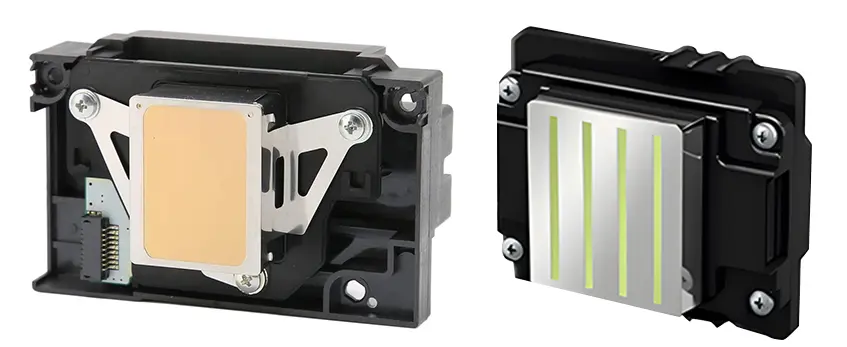
Getting the best results from your A3+ DTF printer means dialing in both hardware and software settings carefully. For resolution, aim for 600 to 720 DPI to balance sharp detail and smooth color transitions — higher DPI can cause slower prints without much visible gain. Most A3+ DTF setups benefit from a quality mode that supports optimal ink layering, especially for the white underbase, which needs careful handling in your RIP software.
Speaking of RIP configurations, focus on these key settings:
- Use accurate color profiles matched to your DTF inks.
- Set ink limits to avoid oversaturation, which can cause bleeding or slow drying.
- Fine-tune the white underbase layer strength and employ proper choke/trap settings (usually 1-2 pixels) to prevent white ink from spilling over colored areas, keeping transfers crisp.
Don’t overlook mechanical checks on your A3+ printer:
- Regularly perform print head alignment and nozzle checks to catch clogs or misfires early.
- Calibration routines tailored for A3+ ensure smooth layering and consistent output, particularly important when printing whites.
Environmental stability is another secret weapon: keep your workspace at an optimal room temperature around 70-75°F and moderate humidity (40-60%). This keeps your DTF ink viscosity steady, reducing clogging and improving print consistency.
For reliable, professional prints, pairing these settings with quality materials like Jinlong DTF inks and using the correct film will take your A3+ DTF practice to the next level. For more detailed guidance on printer models and ideal print workflows, you can check the complete guide for custom apparel printing.
Temperature Settings Across the DTF Workflow
Temperature plays a crucial role throughout the A3+ DTF printer workflow, affecting ink flow, drying times, powder curing, and transfer quality. Keeping your printing environment at an optimal room temperature for DTF printer (around 68-75°F) helps maintain consistent ink viscosity and prevents premature drying or clogging.
When curing the adhesive powder, aim for oven or heat press temperatures around 320°F to 330°F for 3-4 minutes. This range ensures proper melting and binding of the powder to the ink without burning or under-curing, which can cause peeling or cracking later. Adjust curing time slightly based on the powder brand or oven model.
For the heat press transfer step, temperature settings need fabric-specific tweaks:
- Cotton: 320°F to 330°F, 15-20 seconds dwell time, medium pressure
- Polyester: Slightly lower temps, 305°F to 315°F, 10-15 seconds, medium pressure
- Blends and performance fabrics: Test between these ranges to avoid scorching or ink loss
Peel type also affects these settings—hot peel films require immediate peeling after pressing, while cold peel films must cool completely before removing the film to avoid transfer damage. Adjust dwell time and pressure accordingly (higher pressure for cold peel to ensure good adhesion).
Common temperature-related issues include under-cured powder that easily flakes off and cracking from overheating or pressing too long. To troubleshoot, monitor your heat press accuracy with a temperature strip and regularly test transfers while adjusting time and temperature in small increments.
For even better control, explore optimized curing and transfer practices featured in guides like those addressing why transfers crack or peel with jinlong DTF powders. Staying on top of these temperature settings ensures vibrant, durable results from your A3+ DTF printer every time.
Step-by-Step Workflow for Best Results with A3+ DTF
Getting the best output from your A3+ DTF printer means following a clear, tested routine. Here’s a straightforward workflow covering everything from design prep to the final press:
1. Design Preparation
- Use high-resolution files at 300 DPI or higher for crisp prints.
- Set up your design with a white underbase layer to ensure vibrant colors on dark fabrics.
- Mirror the image if required, especially for hot peel transfers.
2. Printing
- Load the A3+ DTF printer with compatible jinlong inks to maintain color accuracy and reduce clogging.
- Select the right RIP software settings: use proper color profiles, ink limits, and white ink choke to avoid bleeding.
- Print at 1440 DPI or higher for sharp details, balancing speed and quality.
- Watch for nozzle check patterns before every print to catch any issues early.
3. Powder Application
- While the print is fresh and still tacky, evenly apply adhesive powder.
- Shake off excess powder to prevent lumps or uneven curing.
- Use premium powders designed to melt clear and bond well with the film and fabric.
4. Curing the Powder
- Cure powder using an oven or heat press at recommended temperatures (usually around 160-165°C) to melt the powder evenly.
- Avoid under or over-curing — under-cured powder won’t stick well, and over-curing can cause cracking.
5. Heat Press Transfer
- Set your heat press to the ideal temperature for your fabric type (generally 160-170°C for cotton; adjust down for synthetics).
- Press for 15-20 seconds with medium pressure.
- If using hot peel film, peel while warm; for cold peel film, wait for it to cool to avoid damage.
- Check the transfer quality, looking for full adhesion without wrinkles or peeling edges.
Visual Cues for Success
- Vibrant, smooth colors without streaks or white spots.
- A solid white underbase with no transparency.
- Even powder melt visible without clumps or powders left loose.
- Clean peel without tearing or ghost images.
Safety Notes
- Always handle heated elements carefully to avoid burns.
- Work in a ventilated area to avoid fumes during curing.
- Use gloves when applying powder to keep skin safe and avoid contamination.
This step-by-step ensures consistent, professional prints that meet the standards for small-run custom apparel using your A3+ DTF printer. For more info on optimizing different parts of your workflow with jinlong inks, check out detailed guides like maximizing the potential of DTF transfer paper and powder.
Fabric-Specific Adjustments and Testing Protocols
When working with an A3+ DTF printer, dialing in settings for different fabrics—like cotton, polyester, blends, and performance materials—is crucial to get durable, vibrant prints. Each fabric type reacts differently to ink absorption, powder adhesion, and heat press temperature. Here’s how to optimize your process:
- Cotton: Use moderate heat press settings (around 320°F) with medium dwell time. Cotton handles powder curing well but watch for excess ink saturation to avoid bleed.
- Polyester: Lower heat (around 300°F) prevents fabric damage. Polyester needs a firm press for good ink adhesion but less dwell time to avoid cracking.
- Blended Fabrics: Test blends carefully as they vary widely. Start with settings between cotton and polyester, then adjust heat and pressure based on the film’s release and print feel.
- Performance Fabrics: Use lower temperatures and shorter press times to protect fabric stretch and moisture-wicking properties. A cold peel film often works best here.
Creating Test Grids:
Set up test swatches that vary ink loads, film types, and curing temperatures on your A3+ printer. This structured approach helps isolate which combination yields the best washability, color vibrancy, and flexibility.
Iterative Testing:
Fine-tune your workflow by comparing results after wash tests and wear. Pay attention to white underbase coverage and color saturation, especially when working with jinlong DTF inks and films. This cycle lets you perfect your settings for consistent, professional results every time.
For more detailed guidance on matching powders and films with your inks, check out the comprehensive DTF printer A3 setup guide: ink, film, powder, and heat press tips to streamline testing and boost your print quality.
Maintenance and Troubleshooting for Long-Term Reliability
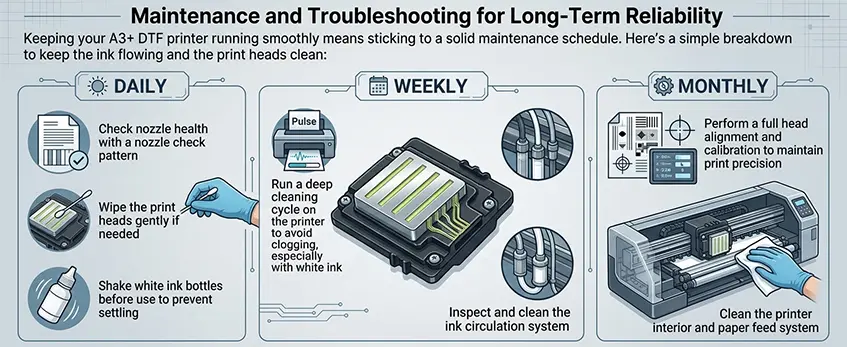
Keeping your A3+ DTF printer running smoothly means sticking to a solid maintenance schedule. Here’s a simple breakdown to keep the ink flowing and the print heads clean:
- Daily: Check nozzle health with a nozzle check pattern; wipe the print heads gently if needed; shake white ink bottles before use to prevent settling.
- Weekly: Run a deep cleaning cycle on the printer to avoid clogging, especially with white ink; inspect and clean the ink circulation system.
- Monthly: Perform a full head alignment and calibration to maintain print precision; clean the printer interior and paper feed system.
Common issues often stem from ignoring proper DTF ink limits or skipping white underbase maintenance, leading to clogged nozzles or patchy prints. If you notice color fades, clogging, or poor white ink opacity, adjust your ink load and run circulation cycles regularly. For frequent white ink problems, this guide to fixing white ink issues offers helpful solutions.
To extend your printer’s lifespan:
- Keep the printing environment stable, avoiding extreme temperatures and high humidity that affect DTF ink viscosity and temperature control.
- Use high-quality inks like Jinlong DTF inks that are designed for consistent flow and less clogging.
- Stick to recommended print settings and avoid overloading ink tables in your RIP software.
With these maintenance practices and troubleshooting tips, your A3+ DTF printer will deliver lasting, high-quality results without frequent downtime.
Advanced Tips and Best Practices for Scaling Production
When you’re ready to scale up your A3+ DTF printer production, keeping output high without sacrificing quality is key. Here’s how to do it right:
- Maximize throughput with consistent printer settings. Maintaining uniform resolution and RIP software configurations reduces waste and reprints. Stick to your proven A3+ DTF printer settings, especially for ink limits and white underbase, to ensure every print stays sharp and vibrant.
- Optimize ink and film use to cut costs. Use only the recommended ink loads to avoid oversaturation and nozzle clogging, which can slow you down. Pair your inks with high-quality films like those from jinlong DTF to get the best adhesion and color payoff, minimizing wasted materials.
- Streamline maintenance routines. Regular daily and weekly cleanings keep print heads in top shape, preventing unexpected downtime. This includes monitoring ink viscosity and flow, especially for white ink, which is prone to clogging.
- Prioritize safety in heat and chemical handling. When curing powders and pressing transfers, follow temperature and pressure guidelines carefully. Proper ventilation is a must when working with adhesives and inks to protect your workspace.
- Leverage jinlong DTF’s consistent consumables. Their inks and films are formulated to work seamlessly together, giving you repeatable, professional-quality results every run. This consistency saves time on testing and troubleshooting as you ramp up production.
Following these best practices ensures your A3+ DTF setup runs smoothly at scale, delivering durable, high-quality custom prints while keeping costs and risks manageable.
For more insights on ink quality and printer choices, check out jinlong prints’ DTF ink CMYK 1L Pro Series and their guide on best DTF transfer printers for t-shirt businesses.





 English
 Español
 Deutsch
 Français