

No products in the cart.

Jinlong
Best Practices for Printing and Testing a DTF Color Chart Guide
Understanding DTF Color Charts: Why They Matter in Your Printing Workflow
In direct-to-film (DTF) printing, color accuracy is everything. A DTF color chart acts as your visual guide, helping you manage and predict how colors will appear on your final prints. This chart is more than just a reference—it’s a crucial tool that ensures consistent results and minimizes costly errors.
The Basics of Color Models in DTF Printing
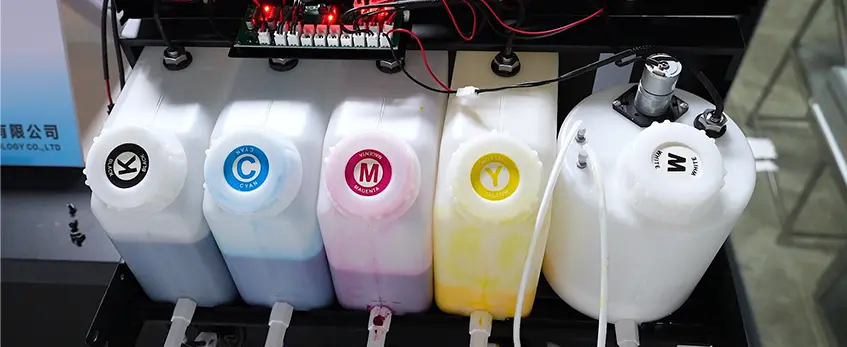
DTF printing typically relies on CMYK color profiles, sometimes combined with white ink as an underbase to enhance brightness and opacity on dark fabrics. Understanding the interplay of these colors is key:
- CMYK Color Profile for DTF: Cyan, Magenta, Yellow, and Black inks mix to form various hues. Optimizing this profile based on your printer and inks improves color fidelity.
- White Underbase Optimization: Essential for vibrant colors on dark shirts, it can dramatically affect how your colors transfer and appear.
Common Color Challenges and How Charts Solve Them
Color shifts, muted tones, or mismatched fabric colors are frequent headaches in DTF printing. A color chart helps by:
- Visualizing exact color output before committing to production.
- Allowing you to identify and adjust for common issues like color fading or incorrect hues.
- Testing different substrates to see how fabric color affects the transfer.
When to Use a DTF Color Chart
Utilize a DTF color chart throughout your workflow:
- Before starting a new project, to verify your printer and ink setup.
- When switching substrates or fabrics, to check how colors perform on different materials.
- During routine maintenance, ensuring ongoing color consistency.
- After software or driver updates, to confirm no unexpected changes in color output.
By integrating a printable DTF swatch chart into your process, you gain control over your color management in DTF printing, leading to sharper, more reliable transfers every time.
Step-by-Step Guide to Printing a DTF Color Chart
Preparing Your Design File for Accuracy
Start with a high-resolution design file that clearly represents the full spectrum of colors you want to test. Use the correct CMYK color profile for DTF printing to ensure your colors will translate well on the final print. Avoid overly compressed images or files with inaccurate color settings. It’s best to work with ICC profiles designed for your specific DTF printer and inks, which help maintain color accuracy right from the digital file.
Printer Setup and Calibration Essentials
Before you print, make sure your printer is properly calibrated. This includes cleaning print heads, verifying ink levels, and ensuring the printer is using the right RIP software color settings aligned with your DTF ink type. Calibration also means adjusting the white underbase depending on the fabric you’ll be printing on—this is key for vibrant colors and smooth transfers. Consistent calibration reduces DTF color management issues and produces more reliable test prints.
Executing the Print Run
When your file and printer are ready, do a test print on the intended transfer film to see how colors lay down. Use a printable DTF swatch chart to compare and evaluate colors, looking for any unexpected shifts or dullness. Print at the highest quality settings your printer supports but balance speed and ink use. After printing, allow inks to dry before applying the powder and curing, following your standard workflow. This step ensures the chart accurately reflects true color outcomes on fabric.
For a deeper dive into calibrating your system and fine-tuning color profiles, check out our guide on color management basics, including ICC profiles and color calibration for DTF printers. This resource is a great place to get your printer setup spot-on from the start.

Effective Testing Methods for Your Printed DTF Color Chart
Testing your printed DTF color chart is a critical step to ensure color accuracy and consistency on the final garment. Here are the key methods to evaluate your chart effectively:
Visual Inspection and Side-by-Side Comparisons
- Check for color consistency across the swatches compared to your digital design.
- Compare prints under natural and artificial light for accurate evaluation.
- Use standard white backgrounds to reduce color influence from surroundings.
- Look for issues like banding, color shifts, or dull areas.
Hands-On Transfer and Fabric Testing
- Perform a test transfer on your target fabric to see how colors appear after curing.
- Observe how the DTF ink color testing changes depending on material type.
- Note any color fading or opacity issues once the ink sets.
- Test on multiple substrates (cotton, polyester) for DTF fabric color matching accuracy.
Advanced Tools for Precision Testing
| Tool | Purpose | Why It Helps |
|---|---|---|
| Spectrophotometer | Measures exact color values and tones | Eliminates visual guesswork |
| Colorimeter | Ensures the consistency of color output | Supports precise ICC profiles setup |
| RIP software tools | Adjust and preview color outputs | Enables fine-tuning during printing |
Using these tools can drastically improve your DTF transfer color accuracy and help maintain color standards across different print jobs.
Incorporating these testing methods into your workflow ensures each DTF color chart print matches your expectations before full production. For printer setup and best transfer practices, check out our comprehensive guide on DTF transfer machines.
Troubleshooting Common Issues in DTF Color Chart Printing and Testing
Even with careful preparation, issues can pop up when printing or testing your DTF color chart. Knowing how to diagnose and fix these problems fast keeps your workflow smooth and your colors spot-on.
Diagnosing and Fixing Color Shifts
Color shifts happen when the colors on your print don’t match the original design or swatch chart. This can be caused by:
- Incorrect color profiles: Make sure you’re using the right ICC profiles for DTF printers and the correct CMYK color profile for DTF.
- Poor printer calibration: Regularly calibrate your printer using color calibration in DTF printing methods to maintain accuracy.
- Ink issues: Old or mismatched DTF ink can result in unexpected color hues. Always test new ink batches with your printable DTF swatch chart.
- RIP software missettings: Check your RIP software color settings to ensure they are optimized for your specific printer and ink combination.
Fix problems by rechecking and resetting your color profiles, recalibrating the printer, or running a test print with a known good batch of ink.
Handling Substrate and Environmental Variables
DTF printing is sensitive to the fabric or substrate choice and the environment, including:
- Fabric color and texture: Different DTF fabric color matching results could alter the final look. Dark or textured fabrics may require adjustments in your white underbase optimization.
- Humidity and temperature: High humidity or fluctuating temperatures can affect ink drying and powder adhesion, causing color shifts.
- Heat press settings: Improper curing can lead to dull or inaccurate colors. Follow best practices for heat pressing DTF on canvas or other materials.
Keep your workspace consistent and consider these variables when troubleshooting.
When to Seek Professional Help
If you’ve tried all the common fixes and still face frequent color mismatches or print defects, it might be time to bring in professionals. Consider expert help when:
- Color calibration tools or spectrophotometer measurements don’t resolve inconsistencies.
- Printer hardware issues seem likely despite resets and maintenance.
- You need advanced custom DTF color correction techniques tailored to your specific workflow.
For quick solutions during high-demand periods, check out the jinlong troubleshooting guide to resolve common printing issues efficiently.
Pro Tips for Long-Term Color Consistency with jinlong DTF
Maintaining consistent color over time is crucial for any printing business using jinlong DTF products. Here are some straightforward tips to keep your colors looking sharp and reliable:
Regularly Calibrate Your Printer: Use ICC profiles designed for jinlong DTF printers to ensure accurate color output. Frequent calibration keeps your CMYK color profile for DTF aligned with your expected results.
Use High-Quality DTF Transfer Films: Always pair your prints with reliable films, like the jinlong DTF transfer film, to maintain color vibrancy and adhesion.
Optimize Your White Underbase: Proper white ink laydown is key for true-to-design colors on darker fabrics. Fine-tune your white underbase settings regularly for consistent DTF transfer color accuracy.
Control Environmental Conditions: Ink performance can vary with temperature and humidity. Keep your workspace stable to avoid unexpected color shifts during printing or curing.
Test Frequently with a Printable DTF Swatch Chart: Running regular test prints helps catch any color deviations early, enabling you to adjust before full runs.
Leverage RIP Software Color Settings: Customize your color management settings within your RIP software to match jinlong ink properties and your specific fabric types.
By sticking to these practices, you’ll get dependable color results every time, ensuring your customers stay happy with vibrant, precise prints. For additional tips on handling DTF materials, exploring jinlong’s DTF papers explained guide can help you master every step of the process.





 English
 Español
 Deutsch
 Français