

No products in the cart.

Jinlong
DTF Transfers Machine Guide for Custom Printing Business Success
Understanding DTF Transfers Machines: Core Mechanics and How They Work
Starting with the basics, you might be wondering: What exactly is a DTF transfers machine, and how does it work? Let me break it down in simple terms.
DTF stands for Direct to Film printing. It’s a process where designs are printed onto a special PET film using water-based ink. After printing, a layer of adhesive powder is applied to the film, which is then cured (heated) and transferred to fabric using a heat press.
Here’s the core workflow of a DTF machine:
- Printing: The DTF printer applies your design in vibrant, detailed colors directly onto a PET film. Special DTF inks are used for durability and color vibrancy.
- Powdering: While the ink is still wet, the film passes through a powder applicator that coats the printed design with hot-melt adhesive powder.
- Curing: The film goes through a drying or curing process to melt the powder and bond it to the ink.
- Heat Press Transfer: Finally, you place the film on your garment and use a heat press to transfer the ink and adhesive onto the fabric. This step fuses the design securely onto cotton, polyester, or even blends.
Why is this important? Unlike traditional screen printing or DTG (Direct to Garment), DTF works on almost any fabric type, including dark colors, without the need for pre-treatment. It offers sharp, lasting prints and great flexibility — perfect for custom apparel printing at home or in a professional setup.
Quick Takeaways:
- Uses PET film as the print medium.
- Prints with water-based DTF inks.
- Applies special adhesive powder before heat curing.
- Transfers designs with a heat press to various fabrics.
- Great for vibrant, durable prints on multiple materials.
Understanding these core mechanics sets a solid foundation before you pick your DTF equipment or dive into the printing process. Knowing how each step works will help you troubleshoot issues and optimize your prints for the best results.
Types of DTF Machines and Their Features
When looking into DTF transfers machines, you\’ll find a few key types to consider, each with features suited for different business needs. The most common types are desktop, roll-fed, and industrial DTF printers.
Desktop DTF Machines
Perfect for small businesses or startups, these compact printers handle smaller volumes and fit well in tight spaces. They’re easy to operate and usually cost less upfront, making them ideal if you’re testing the waters with custom apparel printing.
Roll-Fed DTF Machines
These handle larger sheets or rolls of PET film, allowing for higher production volumes. Roll-fed printers are great for businesses scaling up or offering on-demand custom garment printing because they streamline continuous printing without frequent material reloads.
Industrial DTF Printers
Designed for heavy-duty use, industrial machines support high speeds and larger formats. They come with advanced features like automatic cleaning, multi-color ink systems, and robust heating units for faster turnaround times.
Key Features to Look For:
- Print resolution and speed: Higher dpi means more detailed prints; speed impacts how many orders you can fill.
- Film compatibility: Check if the machine works with various PET films, like the popular DTF transfer film 60cm Pro series.
- Ink system type: Look for CMYK setups that support vibrant colors, often linked to specific ink types like the DTF ink CMYK 100ml basic series.
- Powder application: Some machines integrate powder application (hot-melt adhesive) or may require additional equipment for consistent results.
Choosing the right type depends on your volume needs, budget, and workspace. For small or home-based operations, a desktop DTF printer covers most bases, while growing businesses might find roll-fed or industrial models better suited for scaling efficiently.
Understanding DTF Transfers Machines: Key Specs to Evaluate for Buying a Machine
When shopping for a DTF transfers machine, focusing on the right specs ensures you get the best fit for your custom printing business. Here are the key specs to consider:
Printing Size and Format: Choose a machine that matches your typical print size needs. For smaller operations, an A3-sized printer is often perfect—it balances space, cost, and print capacity well. Check out why an A3 DTF printer is ideal for small to medium apparel shops.
Print Resolution: Look for high DPI (dots per inch) options—typically 720 to 1440 DPI—which deliver sharp, vibrant prints. A higher resolution means better design details and smoother color gradients, especially on cotton and blends.
Ink Compatibility: Verify that the machine supports reliable DTF ink types, such as CMYK with white ink options. Quality inks like those in the DTF ink CMYK 100ml Pro Series play a huge role in achieving vibrant, long-lasting prints.
Powder Application System: Efficient, even powder coating is crucial since the hot-melt adhesive powder bonds the print to fabric. Some machines include built-in powder applicators, which improve speed and reduce mess.
Speed and Productivity: Consider how many prints per hour the machine can handle. Faster machines boost output but may come at a higher price. Match this with your business volume to avoid overpaying or limiting growth.
Durability and Build Quality: Look for sturdy, well-built machines with quality components to avoid frequent breakdowns and maintenance headaches.
Software and Connectivity: Machines with user-friendly interfaces and compatibility with popular design software speed up your workflow.
By assessing these key specs, you\’ll find a DTF machine that fits your budget and business goals, helping you deliver vibrant custom prints efficiently.
Pros and Cons of DTF Technology
DTF (Direct to Film) printing has quickly gained popularity thanks to its unique benefits, but it also has some drawbacks to consider if you\’re starting a custom printing business.
Pros
- Versatility: Works on almost any fabric type, including cotton, polyester, and blends, making it great for vibrant DTF designs on cotton and more.
- Sharp, bright prints: DTF transfers deliver high-quality, durable prints with excellent color vibrancy that really pop.
- Lower startup cost: Compared to DTG printers, DTF machines are generally more affordable, making them ideal for small businesses or home setups.
- No pretreatment needed: Unlike DTG, you don’t need to pre-treat garments, saving time and effort.
- Easy to store transfers: You can print DTF transfers and keep them for later use, enabling on-demand custom garment printing without rushing orders.
Cons
- Powder use: DTF requires hot-melt powder to adhere prints, which adds an extra step and requires proper handling and ventilation.
- Learning curve: Getting the perfect print quality takes practice—adjusting printer settings, powder application, and heat pressing all require fine-tuning.
- Equipment maintenance: Regular cleaning and maintenance are essential to keep the machine in good shape and avoid clogging.
- Film cost: The PET film for DTF printing adds to consumable expenses and varies in quality, affecting print results.
Overall, DTF technology offers a strong balance between cost, quality, and flexibility, making it a solid choice for those looking to start a custom printing business. For more on powder types and how they affect your prints, check out this analysis of DTF hot melt powder.
Essential Equipment and Supplies: Must-Have Core DTF Tools and Machines
Starting your custom printing business with DTF transfers means having the right tools at hand. Here’s a quick run-down of core DTF equipment you’ll need:
- DTF Printer: The heart of your setup. Look for reliable models designed for vibrant DTF designs on cotton and other fabrics. Small businesses often benefit from compact, budget-friendly options without sacrificing quality.
- Heat Press Machine: Essential for curing the transfer powder and applying the design onto your apparel. A heat press made specifically for DTF transfers offers consistent temperature and pressure.
- DTF Powder Shaker or Applicator: Applies the adhesive powder evenly onto the printed film, ensuring lasting prints that won\’t peel or crack.
- Curing Oven or Heat Tunnel (optional for some setups): Speeds up powder curing if your heat press doesn’t have enough dwell time, improving production speed.
- Computer with Design Software: You\’ll need software compatible with your printer for creating and preparing print files—popular options include Adobe Photoshop and Illustrator.
- PET Film Rolls: Special transparent film designed for DTF printing that holds the printed inks before transfer.
Having these core tools in place means you’ll be equipped to deliver quality, durable prints. For reliable PET film options that work well with DTF printers, check out the DTF transfer film collection from trusted suppliers to ensure your supplies match your equipment capabilities.
Essential Equipment and Supplies: Consumables Breakdown
When starting with a DTF transfers machine, knowing your consumables is key. Here’s what you’ll need to keep your custom printing business running smoothly:
DTF Films: These special PET films are the base for your transfers. High-quality films ensure sharp, vibrant prints. Check out the basic series DTF transfer films known for consistent results and ease of use.
DTF Inks: You’ll use water-based pigment inks designed specifically for DTF printing. These inks are crucial for vibrant colors and durability. Choosing the right ink greatly impacts print quality and wash fastness. For more on ink selection, refer to this detailed guide on choosing the right DTF ink.
Specialized Powder: After printing, a hot-melt adhesive powder is applied to the wet ink on the film. This powder bonds the print to the garment when heat pressed and adds durability. Opt for fine, evenly spread powders to avoid clumps or uneven adhesion.
Printable Blanks: These are the garments or textiles ready for printing. Cotton and cotton blends are popular choices for DTF since the prints adhere well and show bright colors. Consider tees, hoodies, totes, or any fabric labeled printable with DTF.
Managing these consumables helps prevent print defects and keeps your workflow efficient. Each plays a specific role, from vibrant designs to solid bonding on fabrics, so investing in quality supplies is a smart move for your custom printing business.
Budgeting Tiers and Cost Considerations
When starting with DTF transfers machines, understanding the budget is crucial. Equipment and supplies fall into different cost brackets depending on your business size and goals:
Entry-Level Setup ($2,000 – $5,000): Ideal for hobbyists or just getting started. This tier usually includes a basic DTF printer, a small heat press, and starter kits for inks, powders, and PET transfer film. Expect slower production times but lower upfront costs.
Mid-Range Setup ($5,000 – $15,000): Perfect for small businesses aiming for more regular production. You get faster printers with better print quality, larger heat presses, plus higher-quality inks and powders. This setup supports moderate order volumes and better durability.
Professional Setup ($15,000+): For established brands or scale-ups. Includes high-end DTF machines with faster printing speeds, industrial-grade heat presses, and bulk supplies. This investment significantly boosts output and efficiency but requires more upfront capital.
Other cost factors to keep in mind:
- Consumables: Regular purchases of DTF inks, PET films, and adhesive powders are ongoing expenses that can add up quickly.
- Maintenance: Budget for cleaning supplies and occasional part replacements to keep your machine running smoothly.
- Workspace: Ensure proper ventilation and heat-resistant surfaces for safety, which might mean some additional setup costs.
- Software: Design software and licensing fees may vary depending on your workflow needs.
Balancing quality and price is key. For the best start, consider checking out the detailed options and supply recommendations available alongside trusted products like the DTF transfer film from Jinlong to find cost-effective solutions tailored to your scale.
Essential Equipment and Supplies: Sourcing Tips and Supplier Recommendations
Finding reliable suppliers for your DTF transfers machine setup is key to keeping your business running smoothly. When sourcing equipment like your DTF printer, heat press, and consumables, focus on quality and consistency to avoid costly downtime or poor print results.
Tips for sourcing:
- Look for specialty suppliers: Choose companies that focus specifically on DTF printing products rather than general printing supplies. This improves product quality and technical support.
- Check reviews and user feedback: Sites with real customer reviews, including jinlong DTF equipment reviews, help confirm reliability.
- Buy ink, powder, and films in bulk: This reduces cost per print and ensures you have a steady supply of core consumables like PET films and DTF powder.
- Test samples first: Before committing to large orders, request sample films or inks to check compatibility with your machine and desired print quality.
- Local distributors matter: Consider U.S.-based suppliers for faster shipping and responsive customer service, which is crucial for tight deadlines.
- Leverage trusted brands: Leading brands often provide warranties and detailed manuals, which help with troubleshooting and maintenance.
For instance, exploring options like the DTF transfer film A4 double pro series can offer a great balance of quality and price.
By being selective and thorough in sourcing your DTF machinery and supplies, you’ll build a stronger foundation for your custom printing business.
Workspace Preparation and Safety for Your First DTF Print
Setting up your workspace right is key to smooth DTF printing. Start by choosing a clean, well-ventilated area with enough room for your DTF transfers machine, heat press, and supplies. A flat, stable surface prevents mistakes during printing and heat pressing.
Keep the space organized: set up dedicated zones for printing, powder application, curing, and cooling. This helps avoid contamination and mix-ups, especially when working with different ink colors or films.
Safety-wise, always wear gloves and a mask when handling DTF ink and powder. These materials can irritate skin or respiratory systems. Make sure to have good airflow or a small exhaust fan if you’re indoors.
Also, position your heat press away from flammable materials and keep a fire extinguisher nearby. Heat press machines get extremely hot, so use heat-resistant gloves when operating. And don’t forget to unplug equipment after use.
Following these workspace and safety steps keeps your setup efficient and your personal risk low as you dive into your first DTF transfer process step by step.
Design Workflow and Software Tips for DTF Printing
Getting your design ready for DTF transfers is a crucial step that impacts the final print quality. Start with a high-resolution image (300 dpi or higher) to ensure sharp and vibrant results. Popular design software like Adobe Illustrator, Photoshop, or free alternatives like GIMP and Inkscape work great for preparing your artwork.
Here are some key tips for your DTF printing design workflow:
- Use transparent backgrounds: DTF printing works best with PNG files that have transparent backgrounds to avoid unwanted white edges.
- Mirror your design: Always flip your design horizontally before printing since the film prints in reverse and transfers to the garment facing forward.
- Optimize colors for DTF inks: Stick to vibrant colors that pop on fabrics, especially cotton. Using CMYK color mode helps ensure accuracy with DTF inks.
- Include a white underbase: Designs require a white layer underneath the color to make the print stand out—ensure your software or RIP supports creating this layer.
- Save in the right format: Export your final design as a PNG or TIFF file to keep quality and transparency intact.
Using reliable RIP software designed for DTF printers can simplify these steps by automatically handling layering, mirroring, and ink management. Investing in one of these tools is worth it for consistent results and smoother workflow. For more on maximizing your printing profits with top DTF printer technology, check out this guide on why investing in a top DTF printer can maximize your printing profits.
Printing Process Explained
Getting your first DTF transfer printed is straightforward once you know the steps. Here’s how the printing process works:
Design Preparation
Start with a high-quality digital design. Use graphics software to set your image at the right size and resolution. Make sure to reverse the design (mirror image) before printing, especially for text.
Load the Film
Place the PET film designed for DTF printing into your DTF printer. This film acts like the canvas that will receive the ink and powder.
Printing the Design
The printer lays down layers of CMYK and white ink on the film. The white ink helps maintain vibrant colors on dark or light garments. Use reliable DTF ink and powder supplies to get lasting, vivid prints—some printers may have specialized settings for ink density and drying.
Powder Coating
Immediately after printing, the wet ink on the film is coated with a hot-melt adhesive powder. This powder sticks to the ink and is key for transferring the design onto fabric.
Curing the Powder
The film with powder goes through a curing oven or heat press to melt the adhesive powder slightly. This sets the powder evenly and prepares the transfer for pressing.
Heat Press Transfer
Place the prepared transfer film onto your blank garment (like a T-shirt). Using a heat press set to the right temperature and time, apply pressure for the transfer to permanently bond with the fabric.
Peeling and Finishing
After pressing, peel the film while it’s still warm (hot peel) or cooled (cold peel), depending on your powder and film instructions. This leaves a smooth, vibrant design on the garment.
This step-by-step DTF transfer process lets you produce vibrant, durable prints on cotton, polyester, and blends, perfect for custom apparel printing. For tips on choosing the right PET film or achieving vibrant prints, check out this guide on DTF transfer film options and DTF ink recommendations.
Troubleshooting Common Issues in Your First DTF Print
When you start making DTF transfers, it’s normal to run into some bumps. Here are the most common problems and how to fix them quickly:
White ink peeling or cracking: This usually means the powder didn’t melt enough or your curing temperature/time was off. Try increasing the heat press temperature by 5-10°F or extend the pressing time slightly. Make sure you’re using high-quality TPU powder designed for DTF, like TPU powder DTF supplies.
Colors look faded or dull: Check your ink quality and make sure the film is properly coated with ink. Using fresh inks and PET film designed for vibrant transfers is key. Also, adjust your printer’s color profiles or run test prints to calibrate.
Ink smudging or bleeding: This happens if prints aren’t dried or cured enough before powdering or pressing. Allow prints to dry completely before applying powder, and double-check your heat press settings.
Transfer doesn’t stick well to fabric: Confirm your heat press temperature, pressure, and time are correct for the fabric type, especially when printing on cotton or blends. Using recommended blanks will help with adhesion too.
Uneven powder distribution: Apply powder evenly and shake off excess powder gently. Too much powder creates clumps, while too little causes patchy prints.
If you keep running into issues, cleaning your printheads and doing regular DTF machine maintenance can solve many problems before they start. Troubleshooting is just part of the process, and every issue has a fix once you know what to look for.
Maintenance and Safety Best Practices
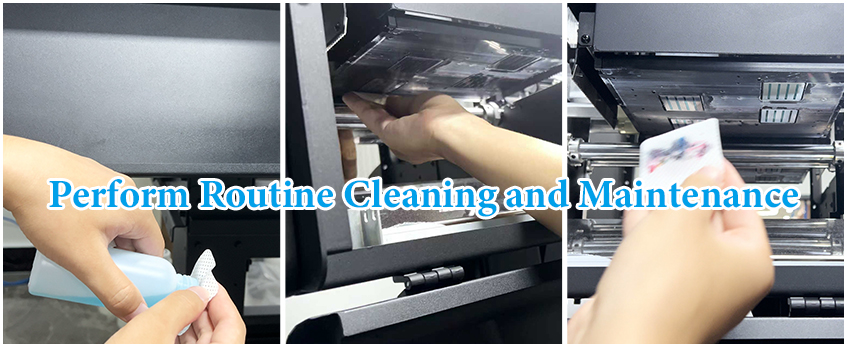
Keeping your DTF transfers machine in top shape means regular maintenance and safety checks. Here are some best practices to help your prints stay vibrant and your workspace safe:
- Clean the print heads regularly to avoid clogging and ensure smooth ink flow. Use recommended cleaning solutions designed for DTF ink.
- Check the rollers and belts for wear and tear, replacing parts before they cause breakdowns.
- Keep the heat press clean and calibrated to maintain consistent temperature and pressure, which is critical for durable prints.
- Store inks, powders, and films properly—keep them sealed and in a cool, dry place to prevent damage.
- Ventilate your workspace well to reduce inhaling fumes from inks and powders.
- Use personal protective equipment (PPE) like gloves and masks during handling of powders and inks.
- Run test prints frequently to catch any issues early, saving time and materials.
- Follow manufacturer guidelines for machine upkeep and always power off before cleaning or servicing.
Regular upkeep not only prolongs your machine’s life but also keeps your custom printing business running smoothly and safely. For information on supplies that help with maintenance, check out the variety of TPU DTF hot melt adhesive powders available to improve print adhesion and durability.
Starting Your Custom Printing Business: Market Research and Niche Identification
Before diving into your custom printing business, doing solid market research is a must. Understanding who your customers are and what they want can save you time and money. For DTF transfers, the market is broad—think custom T-shirts, hoodies, bags, and more—but focusing on a niche helps you stand out.
Here’s how to approach it:
- Identify Your Target Audience: Are you aiming for local schools, sports teams, small businesses, or fashion brands? Each group has unique needs.
- Analyze Competitors: Look at other custom printers in your area or online. What products are popular? Where do they fall short? Use this info to find gaps you can fill.
- Research Trending Designs and Products: Use social media and online marketplaces to spot what’s hot. Vibrant DTF designs on cotton apparel, for example, are in demand for their durability and color pop.
- Evaluate Pricing and Costs: Compare what similar businesses charge and what materials cost. Knowing this helps frame your pricing strategy later.
- Consider Seasonal and Local Trends: Holidays, sports seasons, or local events can provide opportunities for targeted printing orders.
Focused niche selection, backed by thorough market insights, sets a strong foundation. This approach will help you tailor your designs, marketing, and product offerings effectively for your ideal customers.
For a deeper dive into the DTF transfer process and materials, check out this guide on film transfer paper types and uses, which is valuable for understanding what your niche might demand.
Legal and Operational Basics
Starting your custom printing business with a DTF transfers machine means you need to handle some legal and operational groundwork upfront. First, register your business name and choose the right structure—LLC is popular for its protection and flexibility. Make sure you get any required licenses or permits, which vary by state and city. Don’t forget to apply for an EIN (Employer Identification Number) from the IRS if you’re hiring employees or want to open a business bank account.
Insurance is another must—look into general liability and property insurance to protect your equipment and workspace. On the operational side, set up clear workflows, from order intake to production and shipping, to keep your business running smoothly. Also, set up accounting and bookkeeping early to track expenses and income accurately.
By covering these basics, you\’ll build a solid foundation for your DTF custom printing business to grow trouble-free.
Pricing Strategy for Profitability
Setting the right price for your DTF transfers is crucial to make your custom printing business profitable. Start by calculating all your costs: materials like DTF ink and powder, PET films, blanks, plus overhead like electricity, machine maintenance, and labor. Don’t forget to factor in packaging and shipping if you plan to sell online.
Here’s a quick pricing formula to keep it simple:
- Total Cost per Print (materials + labor + overhead)
- Desired Profit Margin (usually 30-50%)
- Add them up to get your base price.
Remember, your price also needs to stay competitive within the US custom printing market. Check out what local competitors charge for similar DTF transfer prints and adjust accordingly while ensuring you still make a reasonable profit.
Offer pricing tiers depending on order volume, such as discounts for bulk orders, which encourages larger sales and helps control production costs. Using a heat press for DTF transfers efficiently can speed up your workflow, lowering your cost per item over time.
Lastly, always revisit and tweak your pricing strategy based on changing supply costs or demand trends to keep your business profitable long-term. For more insights on essential supplies and cost control, resources like this DTF ink and powder guide can help you optimize your spending.
Marketing Essentials and Online Presence
Getting your custom printing business off the ground means more than just great prints—it’s about getting noticed. Start by building a solid online presence. A user-friendly website showcasing your best DTF transfers, clear pricing, and an easy ordering process is key. Include vibrant photos of your work on cotton and other popular blanks to show potential customers what you can do.
Leverage social media platforms like Instagram and Facebook to share your designs, behind-the-scenes looks at your DTF printing setup, and customer testimonials. Regular posts boost visibility and create a community around your brand. Use targeted ads to reach local businesses or groups interested in custom apparel.
Don’t forget local SEO by adding your business to Google My Business and optimizing your website with keywords like “custom T-shirt printing near me” or “best DTF printer for small business.” This helps people in your area find you easily.
Also, consider offering promotions or collaborating with local events to build word-of-mouth buzz. For extra guidance on reliable suppliers and printing insights, check out resources like this reliable DTF printing supplier guide. The right marketing strategy combined with your DTF transfer skills can turn your printing hobby into a thriving business.
Scaling Your Custom Printing Business and Success Stories
Once your custom printing business is up and running with your DTF transfers machine, scaling becomes the next big goal. Growing your operation means more than just taking on extra orders — it’s about streamlining workflows, expanding product offerings, and building a strong brand reputation.
How to Scale Efficiently
- Invest in additional or higher-capacity DTF machines: Upgrading or adding more units can increase output without sacrificing quality.
- Expand your product line: Beyond T-shirts, consider printing on hoodies, tote bags, and other blanks to attract a wider customer base.
- Automate where possible: Use design software and batch printing techniques to speed up production.
- Build partnerships: Collaborate with local boutiques, schools, or businesses for bulk orders or special projects.
- Hire help: Bringing in skilled staff can improve efficiency and reduce bottlenecks.
Real Success Stories
Many small shops have turned their passion for custom prints into thriving businesses by focusing on niche markets like sports teams or local events. Others grew steadily by offering fast turnaround times and superior print quality, partly thanks to reliable DTF equipment and supplies from trusted suppliers.
Scaling smart with solid equipment and clear marketing strategies can turn a simple start into a profitable, sustainable business model. For example, investing in quality DTF ink and powder supplies helped some businesses maintain vibrant DTF designs on cotton, creating loyal customers and repeat business.
With the right approach, your custom printing business won’t just grow — it can become a leader in on-demand custom garment printing in your area.
Startup Costs and ROI Considerations
Starting a custom printing business with a DTF transfers machine means upfront investments you should plan carefully. The main startup costs include the DTF printer itself, heat press for transfers, essential supplies like PET films, DTF ink and powder, plus a computer and design software. Depending on your budget, machines like the JL DTF604S printer offer great quality for small-business operators without breaking the bank.
Here’s a quick breakdown of typical startup costs:
- DTF transfers machine: $2,000 to $7,000 depending on brand and features
- Heat press: $300 to $1,000 for reliable, consistent transfers
- Supplies (films, ink, powders): Initial bulk purchase around $500 to $1,000
- Design software and hardware: $200–$1,000 depending on setup
Your return on investment (ROI) depends on controlling these expenses against your sales volume. DTF printing is cost-effective for on-demand custom garment printing, helping reduce inventory and waste. For example, vibrant DTF designs on cotton and polyester can be sold at a healthy margin without complex setups like DTG printing.
To maximize ROI:
- Buy consumables in bulk to lower per-print costs
- Start small, scale as orders increase
- Focus on profitable niches like custom T-shirts or accessories
- Use efficient workflow and machine maintenance to avoid downtime
With proper startup budgeting and smart sourcing, a DTF printing business can break even fast and generate sustainable profits in the growing custom apparel market. For guidance on materials, check out this detailed DTF transfer film selection to find the best fit for your needs.
Ongoing Expenses and Cost Control
When running a DTF transfers business, keeping an eye on ongoing expenses is key to staying profitable. After your initial setup, recurring costs include inks, DTF transfer films, powder, and replacement parts for your DTF transfers machine. Don’t forget utilities like electricity and maintenance supplies, which add up over time.
Here’s how to manage costs effectively:
- Buy DTF ink and powder supplies in bulk: Purchasing from reliable suppliers can reduce unit costs. Check out options like high-quality DTF transfer films to get the best balance of price and performance.
- Track material usage: Keeping detailed logs helps minimize waste and optimize your purchase orders.
- Routine machine maintenance: Regular cleaning and upkeep can prevent costly repairs or downtime.
- Energy efficiency: Use energy-saving settings on printers and heat presses to reduce utility bills.
- Negotiate with suppliers: Build relationships to get discounts or favorable payment terms.
Maintaining tight control over these expenses helps improve your profit margins and keeps your custom printing business competitive in the long run.
Revenue Projections and Profit Potential
When considering revenue projections for your custom printing business using a DTF transfers machine, it’s crucial to estimate how many orders you can realistically complete each month. Most small businesses can start with 50-100 prints monthly, scaling up as workflow improves and demand grows. Your profit will depend on several factors:
- Pricing per print: Depending on the design complexity, garment type, and size, prices typically range from $10 to $30 per item.
- Material costs: Films, DTF ink, powder, and blanks affect your expenses but tend to lower as you buy in bulk.
- Turnaround time: Faster delivery can command premium pricing and attract repeat customers.
A well-managed setup can reach monthly revenues between $1,000 to $5,000 or more in the early stages, rising significantly with marketing and operational efficiency. Keep in mind, profit margins for DTF printing often sit fairly high—usually between 30-50%—thanks to reasonable supply costs and growing demand for vibrant designs on cotton and other materials.
Remember, investing in quality equipment like a reliable DTF printer plays a key role in maintaining consistent output and preventing costly downtime. For example, checking out a JL DTF604P DTF digital printer could give you an edge with its pro-series features.
Tracking your revenue and tweaking your pricing as you go ensures your custom printing business remains profitable while staying competitive.
Risk Mitigation Strategies for Your DTF Transfer Business
Starting a DTF transfers machine business comes with risks, but with some smart strategies, you can keep them under control and protect your investment.
1. Diversify Your Product Offerings
Relying on just one type of product or niche can be risky. Expand into different types of apparel or accessories to reach more customers and reduce dependency on a single market.
2. Build Strong Supplier Relationships
Secure reliable sources for your DTF ink, powders, films, and blanks. Having multiple suppliers prevents downtime if one runs out or delays orders. For quality TPU powders, check trusted options like the TPU DTF hot melt adhesive powder which offer consistent results.
3. Maintain Your Equipment Regularly
Downtime from machine failures can hurt your profits. Follow a strict maintenance schedule and keep spare parts handy to reduce repair time. Regular care extends the life of your investment.
4. Price Your Services Strategically
Set prices that cover costs and factor in unexpected expenses—don’t underprice your work just to win clients. Knowing your break-even point helps avoid losses and keeps your business sustainable.
5. Manage Cash Flow Carefully
Keep a close eye on income and expenses. Setting aside an emergency fund helps you stay afloat during slow periods or equipment repairs.
6. Stay Informed on Industry Updates
DTF printing technology evolves quickly. Keeping up with trends and improvements means you can adapt faster and avoid outdated methods that might cost more in the long run.
By following these risk mitigation strategies—diversification, reliable suppliers, equipment care, smart pricing, cash flow management, and staying current—you’ll build a solid foundation for a profitable custom printing business.
Workflow Optimization Hacks
Making your DTF transfers machine run smoothly is key to boosting productivity and cutting down costs. Here are some practical workflow hacks to streamline your setup:
- Organize your workspace: Keep all essential tools like PET film, DTF inks, powders, and heat press positioned within easy reach to speed up the process.
- Pre-design setup: Use templates and batch processing in your design software to save time on repetitive jobs.
- Standardize print settings: Develop consistent printer profiles for different fabric types to avoid test runs and wasted supplies.
- Automate drying and curing: Set up conveyor dryers or dedicated curing areas for faster powder melting and ink setting.
- Regular machine calibration: Keep your DTF printer in top shape with scheduled maintenance and calibration to avoid downtime.
- Keep a print log: Track print jobs, materials used, and issues encountered to identify bottlenecks and improve quality over time.
For those looking to maximize efficiency, models like the JL DTF604S DTF digital printer offer great features tailored for fast-paced custom printing businesses. With workflow optimization, you’ll get vibrant DTF designs on cotton and more, all while cutting time and waste.
Industry Trends and Technology Updates
The world of DTF transfers is evolving fast, and staying ahead means keeping up with the latest trends and tech updates. Right now, the biggest shifts include the rise of more eco-friendly inks and powders, which reduce waste and offer better color vibrancy on a wider range of fabrics. There\’s also growing interest in advanced DTF machines that speed up printing without compromising quality—perfect for small businesses looking to scale.
Another hot trend is integrating DTF with on-demand custom garment printing, allowing entrepreneurs to fulfill orders quickly without holding inventory. Plus, new software updates make design workflows smoother, with easier color management and faster file processing.
If you’re serious about your DTF printing setup, checking out expert reviews like the Jinlong DTF equipment reviews can help you spot the latest innovations. Keeping your machine’s firmware and software up to date, along with using quality consumables, also keeps your prints vibrant and long-lasting.
To wrap it up, watch for:
- Eco-friendlier DTF ink and powder options
- Faster, higher-resolution DTF printers
- Software enhancements for design and print accuracy
- Integration with online on-demand printing platforms
Keeping pace with these trends helps maintain competitive edge and ensures your custom printing business thrives in a crowded market.
Quality Control and Customer Feedback
Maintaining top-notch quality is critical for any custom printing business using a DTF transfers machine. Consistent prints with vibrant colors and sharp details keep customers coming back. Here’s how to stay on point:
- Regular Quality Checks: Inspect each batch for ink adhesion, color accuracy, and print durability. DTF prints on cotton and other fabrics should be tested for softness and wash resistance.
- Use Reliable Supplies: Stick with trusted DTF ink and powder supplies to avoid fading or cracking. High-quality PET film for DTF printing also impacts the final result.
- Calibration and Maintenance: Keep your DTF machine calibrated and clean to prevent nozzle clogs and misprints. This reduces waste and improves print consistency.
- Collect Customer Feedback: Actively ask buyers for input on print quality, comfort, and overall satisfaction. This info helps you tweak your process and catch issues early.
- Offer Samples: Providing free or discounted samples to loyal customers can build trust and encourage honest reviews.
- Track Returns and Complaints: Keep an eye on return rates linked to print issues. Use this data to improve your printing process and supplier choices.
Listening to customer feedback paired with strict quality control can set your DTF printing setup apart and grow your reputation for reliable custom apparel printing. For more insights on ink and supplies that can help maintain print quality, check out our detailed DTF ink and printer guide.
Community Involvement and Resources
Getting involved in the DTF printing community is a smart move to grow your custom printing business. Connecting with other printers helps you stay updated on the latest trends and troubleshoot common issues faster. Consider joining online forums, social media groups, or local meetups focused on DTF transfers and custom apparel printing.
Here are some ways to tap into valuable resources:
- Online Communities: Platforms like Facebook groups and Reddit offer active discussions on DTF setups, ink and powder supplies, and workflow tips.
- Webinars and Workshops: Many suppliers and industry experts host free or low-cost sessions. These can boost your skills and introduce new techniques.
- Supplier Networks: Build relationships with trusted vendors for reliable material sourcing, such as Jinlong’s TPU heat-melt adhesive powder and DTF printers. A strong supplier partnership often means better pricing and support.
- Industry Events: Trade shows and expos offer a chance to see new technology, including the latest DTF machines, and to meet peers and mentors.
By leveraging these communities and resources, you’ll gain insights that can improve your DTF printing setup and help you deliver vibrant, high-quality prints consistently. Staying connected is key to keeping your custom printing business competitive and profitable.





 English
 Español
 Deutsch
 Français